I added some quick scroll hyperlinks to a page on my website. When you click on them it takes you to the correct section. However the menu stops working for submenu items. Let me explain better in the following private note.
Hello @Londibob,
Thanks for asking. 
Please make sure to turn off Bar Content Scrolling. For more details please take a look at the solution mentioned in following thread.
Thanks.
I think you replied before I completed writing my secure message. Please recheck.
I also have a problem on the same page with single image lightboxes. When I click on the image and then close it, the website adds an # at the end of the url. When this happens the sub items of the Menu don’t appear when you hover over the menu. Click on one of the maps and you’ll see what I mean. After the image opens and you close it the menu hover function stops working.
Hey there,
Thanks for the update. I checked your site and tested the hyperlinks as well. It looks like you’ve custom JS in your page builder’s JS section which is triggering an error which further breaks the site
 .
.

Please backup and remove your custom scripts from the JS section of your page builder and check the site again. Please note that there’s no need to include <script></script> tags in the JS section as they are included by default. One more thing I’ve noticed is that you’re trying to include jQuery library in the theme, it’s not needed as it is already included by default.
Hope this helps!
I never added that code. I have no idea how it got there. I have removed it but it made no difference.
Hi again,
I checked your site and I still see an error which is breaking your site:
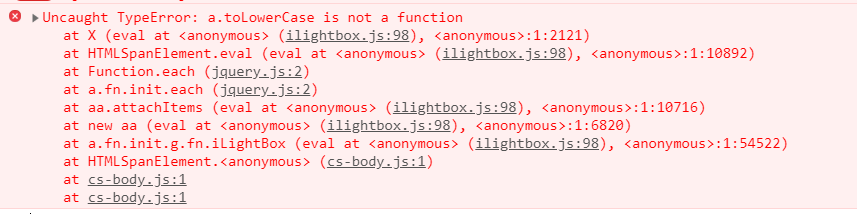
Please check for the following first:.
-
Test for a plugin conflict. You can do this by deactivating all third party plugins, and seeing if the problem remains. If it’s fixed, you’ll know a plugin caused the problem, and you can narrow down which one by reactivating them one at a time.
-
Remove custom CSS, JavaScript and deactivate your child theme and switch to parent theme (take a complete backup first).
-
If you’re using a caching plugin, clear all caches including browser cache then deactivate your caching plugin and other optimization plugins.
-
If you’re using a CDN, please clear the CDN’s cache and disable optimization services.
Let us know how this goes!.
Thanks for the reply. I tested all those things and none of them were the issue. In the end the issue was that I had entered a class called “lbx” on a couple of V2 images, when testing lighbox. Once I removed these values everything worked perfectly. Not sure why an unassigned class would damage the menu hover.
What was strange though was that during testing i found some miscellaneous code on the page CSS. I dont understand how random code is being entered into the JS and CSS sections.
Anyway for now everything is fine. I would suggest adding the option to trigger lightbox on V2 Images. Meanwhile the Help documentation on the lightbox shortcode page is pretty useless and should be updated for the use with V2 images and for single image lightboxs.
Hi There,
We certainly appreciate the feedback! This is something we can add to our list of feature requests. This way it can be taken into consideration for future development. All of these items are discussed with our team internally and prioritized based on the amount of interest a particular feature might receive.
Thanks!
This topic was automatically closed 10 days after the last reply. New replies are no longer allowed.