How to use multiple fields with cornerstone dynamic content register field?

I am trying to use your Dynamic Content API to create a custom field that gives me a URL to the desired size of a media file.

But no matter what I do, I only get the selection for the media sizes, but cannot enter an ID because the field does not appear. I have looked at several examples in your code where the controls do exactly the same.

screenshot_ 2025-07-17 um 08.34.27

screenshot_ 2025-07-16 um 16.53.22

What am I doing wrong?

@Regnalf

Hey @Regnalf,

Thanks for writing in! Can you not insert the ID when enabling the Break-Out Mode? Check out this documentation to know more about this feature.

Best Regards.

I don’t know what you are trying to say about my problem?

If you mean the Cornerstone logic with the CS picture element that you can enter the picture (Post ID) with the addition of the size, I know that.
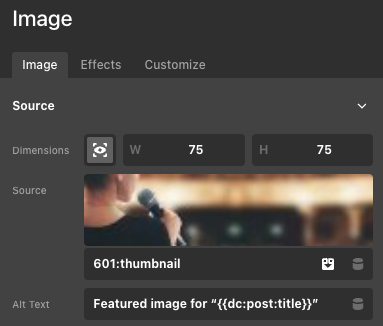
screenshot_ 2025-07-17 um 08.29.41

Likewise the possibility to enter the size as an argument in the already existing function of the for an featured image of a post.
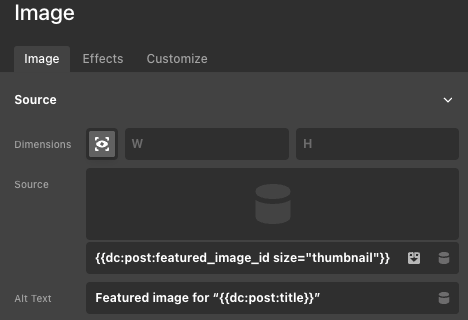
screenshot_ 2025-07-17 um 08.25.47

But I need the URL of any image that can also come from a looper, where I only have the post_id for this media attachment available.

I have to fill this in with an attribute, and therefore need my own dynamic content like this:
(the “id” ist fixed here for demonstration and should be dynamic as well in a looper)
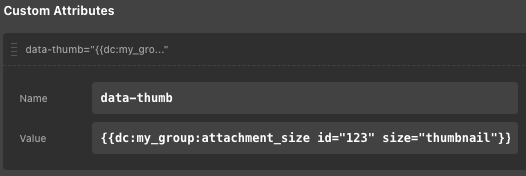
screenshot_ 2025-07-17 um 08.35.31

But as I have already written, I only ever get the selection of possible sizes, but not the field for the ID.

Hello @Regnalf ,

Thank you for the update.

Have you tried setting the type of the id parameter to text instead of number? The number type (which is treated as a slider or range input) is not supported in the dynamic content field.

[
        'key'     => 'id',
        'type'    => 'text',
        'label'   => 'Attachment ID'
]

Let us know if this works for you.

Best regards,

Thanks @Ismael for your hint with the number field type in Dynamic Content. Your clarification that number types are not supported and are treated as sliders/range inputs was extremely helpful and resolved my issue immediately (by changing it to text ).

However, this critical piece of information is missing from your Dynamic Content API documentation , or at least not clearly highlighted. This led to significant time spent on debugging for me, as the documentation implies number is a valid type option for custom controls.

screenshot_ 2025-07-17 um 21.05.35

I strongly recommend updating your documentation to explicitly state:

  1. Unsupported type for Dynamic Content Controls: Clearly mention that type: 'number' is not supported for Dynamic Content controls and will prevent the field from appearing, advising users to use type: 'text' instead for numerical inputs.
  2. Examples for Multiple Controls: The current documentation primarily shows examples with single controls. It would be highly beneficial to include a clear example of how to register a field with multiple controls (like my image_id and image_size example), as this is a common use case.
  3. Best Practices for Numerical Inputs: Advise users that even when using type: 'text' for numerical inputs, they should implement server-side validation (e.g., using (int) cast and is_numeric() checks in PHP) for robustness and security.

But really many thanks for the powerful tool dynamic content API.

Hi @Regnalf,

Glad to hear that helped! We’re still in the process of updating the documentation, so stay tuned for more improvements. We will keep your recommendation in mind.

Thanks

This topic was automatically closed 10 days after the last reply. New replies are no longer allowed.