How do I customize the accordian according to my desires? I’m attaching a screenshot. These are the only things that I can do while customizing the element, I can’t change BG color, text color or do any kind of styling on this element.

How do I customize the accordian according to my desires? I’m attaching a screenshot. These are the only things that I can do while customizing the element, I can’t change BG color, text color or do any kind of styling on this element.
Hello Joe,
Thanks for writing to us.
In order to style the accordion I would suggest you go to the accordion element —>Item—>Background.
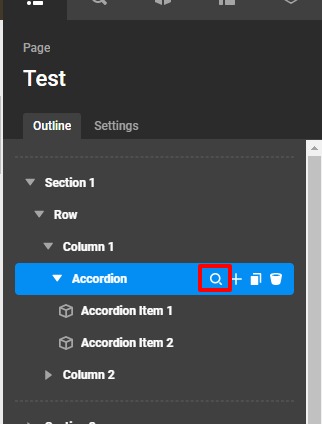
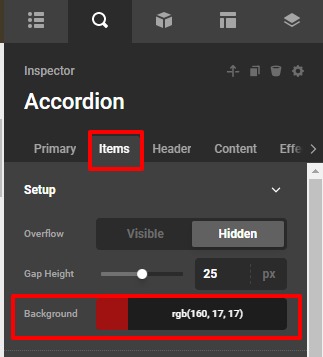
You may change the content color or background color.
You can also change the accordion header text color by going to the accordion Header tab. In case you have not seen the doc of the accordion please have a look at it.
Thanks
This helps, thank you.
Hello Joe,
Glad that we were able to help you. Please feel free to open a new thread if you have any more concerns.
Thanks
This topic was automatically closed 10 days after the last reply. New replies are no longer allowed.
