I’m looking to make the very right menu item, “Give”, a button and I’m not sure how to do that. Any suggestions?
http://dallas170.arvixeshared.com/~bburwell/mydummydomain.com/
I’m looking to make the very right menu item, “Give”, a button and I’m not sure how to do that. Any suggestions?
http://dallas170.arvixeshared.com/~bburwell/mydummydomain.com/
Hello there,
Please add this following CSS code in X > Launch > CSS:
.x-navbar .desktop .x-nav>li:last-child a {
    background: #fff;
    padding: 0;
    height: 35px;
    width:  80px;
    display:  flex;
    justify-content:  center;
    align-items:  center;
    border-radius: 25px;
    transition: 0.4s linear;
}

.x-navbar .desktop .x-nav>li:last-child a span {
    padding: 0;
}

ul#menu-primary-menu {
    display:  flex;
    align-items: center;
}

.x-navbar .desktop .x-nav>li:last-child a:hover > span {
    box-shadow: none;
}

.x-navbar .desktop .x-nav>li:last-child a:hover {
    background-color: #ccc;
}
Just adjust your color with your preferred color code.
Let us know how it goes.
Best regards.
Perfect! How do I make the button a square instead of rounded edges?
Hi there,
Please remove this line from the code you added:
border-radius: 25px;
That should do it.
Thanks.
You all are awesome!
You are most welcome!
Thanks
This what I was looking for, although I’m can’t see where and what I need to customise for it work. I don have some other code for the Navbar, might this be conflicting?
Thanks in advance.
Hi there,
This is only applicable to his site’s current setup, if you have the same setup then it should work as well. Would you mind providing your site’s URL and which menu item should have this CSS? Maybe you’re on Pro header.
Thanks!
Hi,
Thank you for responding. Sorry for late reply.
Im using a regular header. here is the url http://becomeanathlete.co.uk
Thank you
Hello There,
Which of the menu item you would want to become a button? This is to make sure that we can give you a concrete answer and a tailored solution to your issue.
Please let us know how it goes.
The “booking” item please.
Thank you.
Hey There,
To resolve your issue, please add the following CSS code in the X > Launch > Theme Options > Global CSS (http://prntscr.com/evui3r)
.x-navbar .x-nav > li.menu-item-10673 > a {
    padding-top: 20px;
}

.x-navbar .x-nav > li.menu-item-10673 > a:hover {
    box-shadow: none;
    color: black;
}

.x-navbar .x-nav > li.menu-item-10673 > a > span {
    padding: 5px;
    background-color: red;
}
Hope this helps. Please let us know how it goes.
Thank you for your reply.
I’ve copied it to the CSS area, however tis has not changed anything.
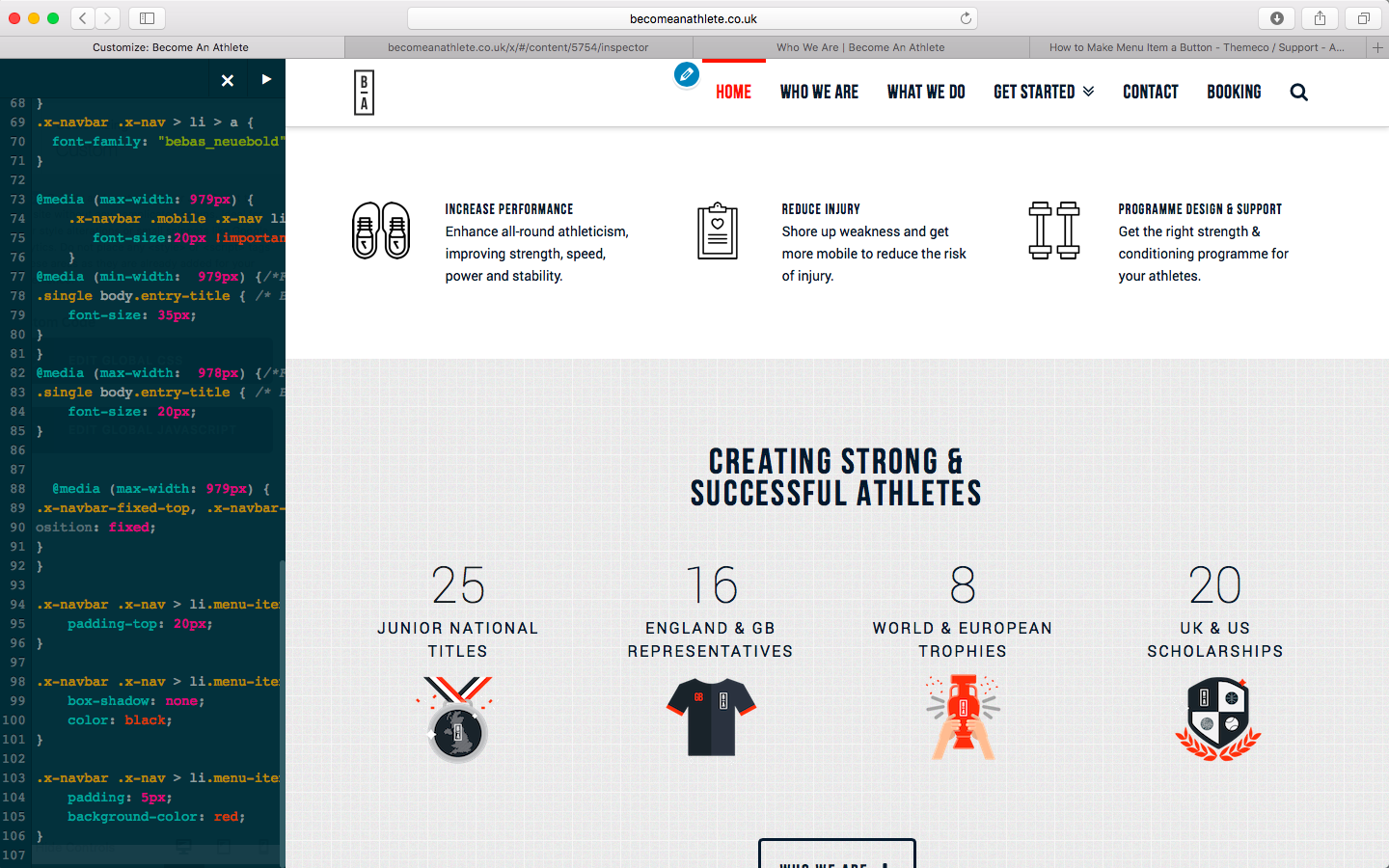
This is some other CSS I’m using for the Navbar
}.x-btn-navbar.collapsed {
color: rgba(0,0,0,1);
box-shadow: none;

}

.x-btn-navbar.collapsed:hover {
box-shadow: none;
background: transparent;
color: rgba(0,0,0,1);
}

.x-btn-navbar {
box-shadow: none;
background: transparent;
}
.x-navbar .x-nav .sub-menu a {
font-size: 20px;
}
.x-boxed-layout-active .entry-wrap {
border:0;
}

.entry-wrap {
box-shadow: none;
}
.widget {
  text-shadow: none !important;
}
.x-navbar .x-nav > li > a {
  font-family: "bebas_neuebold" !important;
}

@media (max-width: 979px) {
    .x-navbar .mobile .x-nav li>a {
       font-size:20px !important;
    }
@media (min-width:  979px) {/*For desktop*/
.single body.entry-title { /* Blog heading Title */
    font-size: 35px;
}
}
@media (max-width:  978px) {/*For mobile*/
.single body.entry-title { /* Blog heading Title */
    font-size: 20px;
}


  @media (max-width: 979px) {
.x-navbar-fixed-top, .x-navbar-fixed-left, .x-navbar-fixed-right {
osition: fixed;
}
}Hi.
Have just seen that this has happened to the Booking item in Mobile menu…
Thanks, 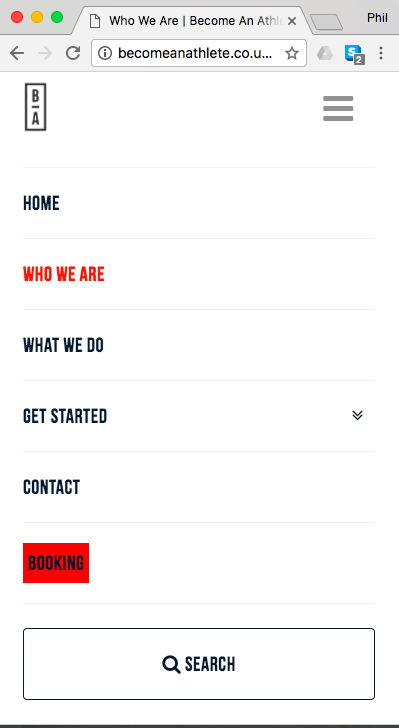
Hi again,
You should try adding the suggested code in your Child Theme’s style.css file. I added the same code via Chrome’s developer tools and it works fine.
Make sure to clear browser’s cache after adding the code. Let us know how this goes!
Hi, thank you for the suggestion.
I believe I am adding the code to the Child Theme and I’ve also deleted all browser history in Chrome and viewing in Chrome but still not working.
I must be doing something wrong.
Hi again,
I checked your Child Theme’s style.css file via Developer’s tool but I don’t see the code added in the file (see screenshot)
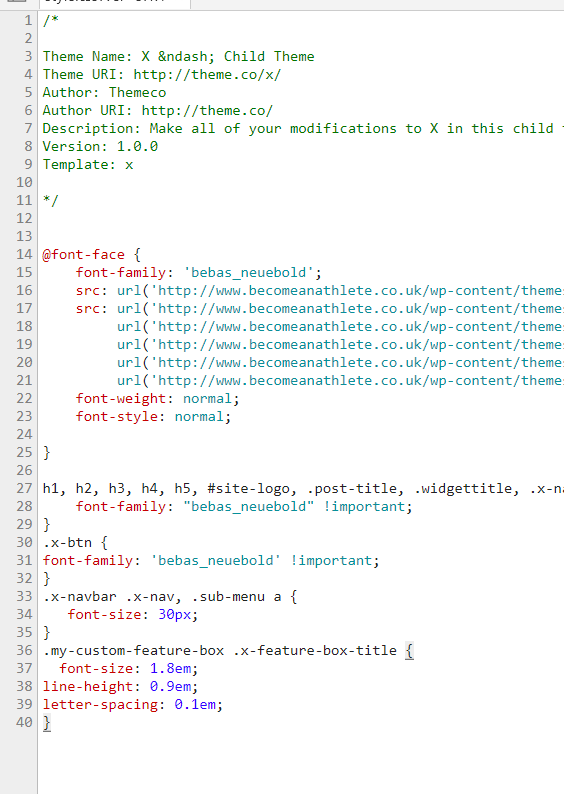
It must be the cache then if you’re using any optimization plugin or Cloudflare, delete the cache and see if this resolves the issue.
Let us know how this goes!
Thank you for this. It has made a change. However, is there a way to align the text. Please see attached image.
Many many many thanks so far.
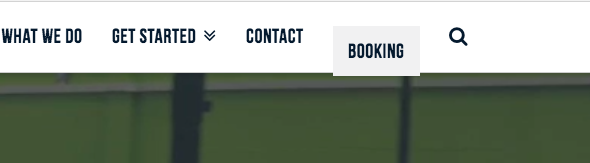
Hi there,
Kindly replace this line f code:
.x-navbar .x-nav > li.menu-item-10673 > a > span {
    background-color: red;
    padding: 5px;
}
with this:
.x-navbar .x-nav > li.menu-item-10673 > a > span {
    padding: 10px;
    margin-top: -10px;
    background-color: red;
}
Kindly open up new threads for additional questions as it will help us to focus on each issue and give you a better support which you deserve. Having a long threads makes the maintaining job harder and also it will be harder for the other customers to find the correct information if they have similar issues. You are always welcomed to reply to this thread to follow up the same question.
Thank you.