How to make full-width containers without using Cornerstone

Hello,

I am trying to make a page with sections that are the full-width of the screen (as seen here), but after removing the sidebars and setting the content layout (Customize -> Layout and Design -> Content Layout) to Fullwidth, the blocks I am using in the Gutenberg editor are still not the width of the screen.

I moved away from Cornerstone and am trying to make this work in the standard Wordpress editor.

What am I missing here?

Thanks!
Hi @vmatt21,

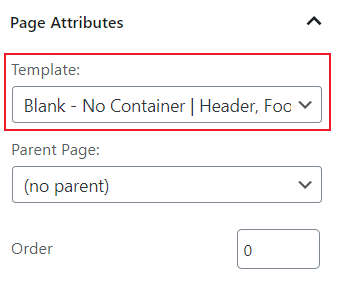
Thank you for reaching out to us. To make the page a truly Fullwidth page, please edit the page in WordPress page editor and change the Page Template to Blank - No Container | Header, Footer (see screenshot)

image

To learn more about page templates, please visit https://theme.co/docs/page-settings#page-attributes

Let us know how this goes!

Thank you for your help.

I actually am using posts (sorry, I mistyped before).
Can you let me know how to do this within X and Renew?
for Posts?

Hi @vmatt21,

Regretfully, the (blog) Posts has no template option, you need a custom CSS to make its main container a fullwidth (100%).

You can find the proper CSS code selector using the Chrome browser Developer Toolbar
For the CSS code itself, I suggest that you get started with this tutorial

Thanks,

This topic was automatically closed 10 days after the last reply. New replies are no longer allowed.