How do I get header to have navbar that looks identical to the primary/main navbar

Hi,

How do I create a header that has navbar that looks identical to the primary/main navbar. I have tried creating a navbar on one of the headers in a certain page, but I could not get it to have the same format as the primary website navbar.

Essentially I want 2 navbars and for them to look identical (preferably like the current navbar format-wise) but to have different menu options.

Thank you!
Hi @dansedmonson,

As you are using the Pro, you have the Header & Footer builder with it. In the Header & Footer builder, you can create a header and cloned the same header for the other page with the different navigation.
Please go through the following articles on how to use the Header & Footer builder and set up the Navigation with it.

  1. https://theme.co/docs/header-footer-overview
  2. https://theme.co/docs/how-to-set-up-navigation

Note: Please check how you can assign a header to a page: https://theme.co/docs/header-footer-overview#how-to-assign-the-header-footer

Hope it helps.

Thanks

Thanks for the reply. How can I make the header sticky?

Hello @dansedmonson,

To make the header the header sticky. Please follow these steps.

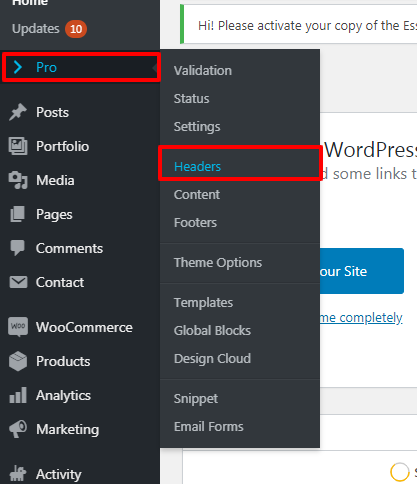
  1. Login to your Dashboard --->PRO--->Header

header-2

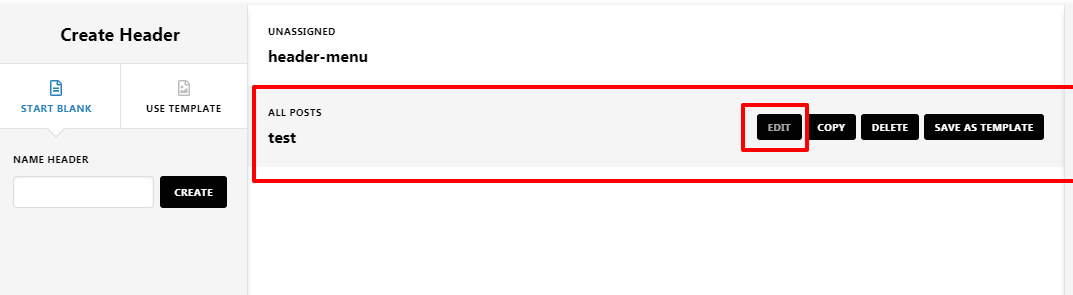
  1. Now click on the Edit button on your custom Header

  1. You set the Header sticky from here.

Thanks

Doesn’t seem like I have that option:

Please advise.

Hi @dansedmonson,

You need to enable the Advanced Mode to get those options while inspecting the elements using the builder. You can get more help on this article: https://theme.co/docs/advanced-mode#how-to-enable-disable-advanded-mode

Thanks

This topic was automatically closed 10 days after the last reply. New replies are no longer allowed.