Hide parts of the header on pages outside the homepage

Hi
I created a header with three bars, the third bar is the menu, when you scrol the page the menu stays and is locked on top.
But when I choose a menu item eg SensiTherapie then then Bar1 and Bar2 are visible again, I don’t want that, they should only visible on the home page.

What is the best solution to achieve this?

This header is now assigned to the whole site. Do I need to create a copy from the header with only Bar3? and assign to the other pages?

Or is there a better solution so I don’t have to maintain two headers?

Is it possible to make parts of the header invisible on certain pages?

I upload an image to clarify it

Best Regards,
Ercole

Hey Ercole,

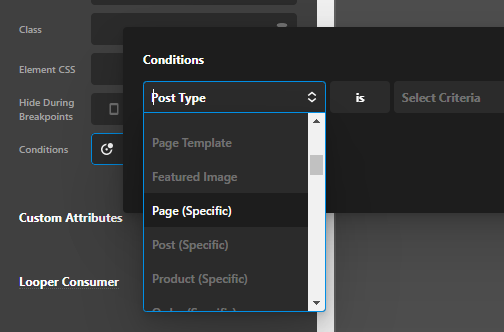
The Conditions feature is not limited to the whole header assignment. It’s also available per element so you can still set your header to display for your Entire Site then just set individual “conditions” per element so you can display an element when a certain condition is met like display for specific page.

image

The Conditions feature is available under the Customize tab.

image

For complete details, please see https://theme.co/docs/conditions-and-assignments

Hope that helps.

This topic was automatically closed 10 days after the last reply. New replies are no longer allowed.