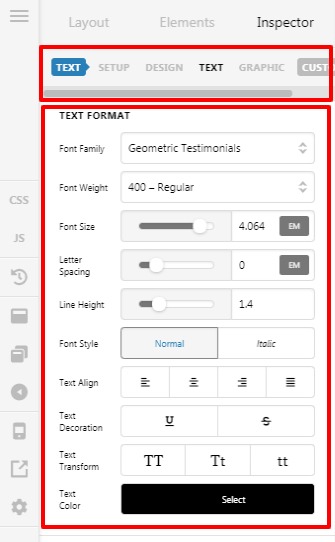
Headline element not appearing properly

I have inserted the Headline element on a new page but it is not displaying as a headline. The “classic featured headline” element works properly however.

Please see this page https://essentialpuree.com/press-room/
the sentence at the top that begins with "Press, accolades for..." is the headline element.
Hello @82West,

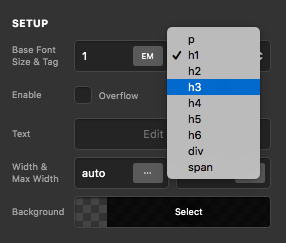
Thanks for writing in! The classic featured headline has pre-built styles and you have very limited controls over it. The new headline element will allow you to have full control over the tag, margin, padding, borders, fonts, and a lot more. When you insert the headline, it displays the default styling first. You will have to style it to look like a header.

Screen Shot 2020-12-03 at 10.03.59 AM
Screen Shot 2020-12-03 at 10.04.24 AM

If you don’t see some of the element style options, you need to turn on the Advanced Mode by going to the Settings > Preferences > Advanced Mode

Thanks for the reply.
It’s not that I need to style the headline. It’s that it’s displaying as the default style for this theme. Choosing H1 or any other styles doesn’t change the apperance either. It just looks like regular text. Can you take a look at my site admin and tell me what if something is interferring with the function of the theme and Cornerstone?
Thanks.

Hello @82West,

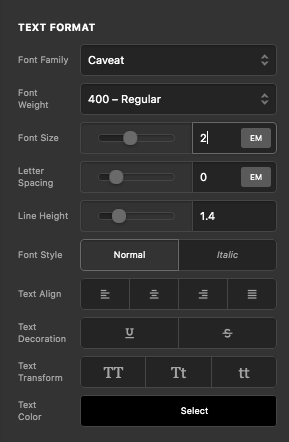
I checked your given page URL it seems that the Cornerstone is functioning fine. You have set font-size for the headline element is 1em that is the default size.

To change the font-size and font-family etc you need go to your page’s —>Headline Elements --->Text Format. Now change the font size and font style form default to your desired size and style as per your design.

Hope it helps
Thanks

This topic was automatically closed 10 days after the last reply. New replies are no longer allowed.