Header Help!

Hi,

I’m trying to build a header menu and am struggling with a few aspects.

This is what I’m aiming for:

and this is as far as I’ve got:

I’m struggling to spread the navigation to the edges like in the first image and also wish to underline the active page (and if possible, subpages) in the navigation bar. Is this possible?

Thanks,
Connor
Also, I’ve used absolute position on the bar to overlap it with the rev slider presenting the background, which I only really require for the home page. Is there a better way to do this overlap or can I set it back to relative for the rest of the site?

Hello @connorbennett,

Thanks for writing in!

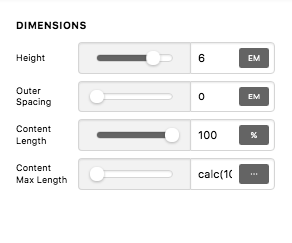
Please set your maximum content length to 100% or simply calc(100% - 0em) in your bar settings.
OaleXep1RFWdP5MrcRiO5w

The 0em were taken from your outer spacing.

If you need a bar with an absolute position for the homepage, it would be best that you create two custom headers. One can be assigned for your homepage and has the absolute positioning and then create another custom header that will be your global header which has the relative positioning.

Best Regards.

Hi, I’ve made those changes but it doesn’t seem to be having an effect.

This is in the bar settings, which has the container inside and then the navigation?

Hi @connorbennett,

The recommended setting is for the bar itself. Would you mind providing your temporary login credentials so we could check which elements need an alignment? Normally, setting header to 100% will make it full-width including its container. I tried it on my install and confirmed it.

Thanks!

Hi,

The page with the header on is here: https://wearemaniac.com/about-us/

As a side note, I’m also trying to align the text paragraph on the page with the second page in the menu so not sure if that has to be considered when doing this?

Hi @connorbennett,

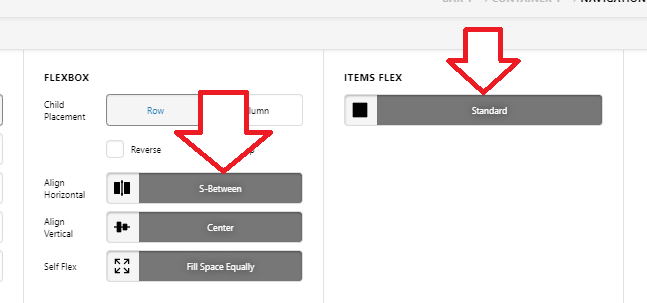
I checked and it’s due to menu item’s width. Please follow this navigation inline setting

image

Would you mind clarifying the text paragraph and the second page? I’m not sure if I fully understand the question. But if it’s alignment content and header contents then it might not possible depending on the result, they belong on a different layout.

Thanks!

That’s worked perfectly, thanks!

For the text paragraph alignment, I’m looking to align the paragraph on the right of the page with the ‘work’ item in the menu navigation, in the same way that ‘MANIAC’ is aligned with the ‘home’ item. Is this possible?

Hey Connor,

It’s possible but tricky as you’d need to set the column width proportions per screen size.

Hope that helps.

Hi,

That’s working for me on the page builder but it slips out of alignment when the site goes any wider.

Thanks,
Connor

Hi Connor,

For that to work perfectly, you need to have your header and content have the same number of columns (you can use gap element for empty column).

You also need your Header’s bar Content Lenght and Content Max Lenght identical to Site Width and Site Max-width

Cheers!

Hi,

I’ve given this a go but it still slips as I change the size of the browser. I switched my navigation to a four column header made of text boxes instead and tried to match this on the page but it still slips.

Hi @connorbennett,

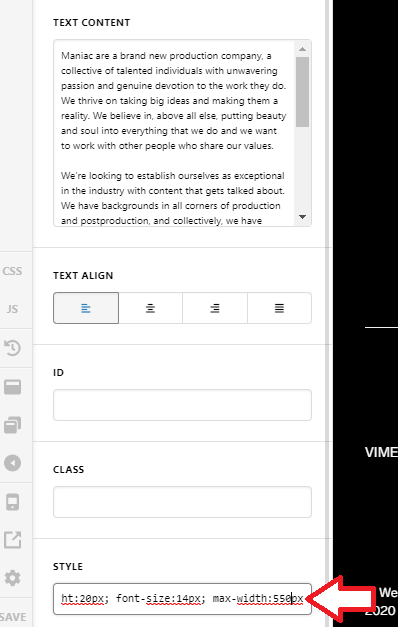
Do you mean the left side of the text aligned with work menu, then the right of the text aligned all the way to the Contact menu? Because as far as I can tell, it’s already aligned with the work menu item, if what you’re trying to do is align the text up to the Contact menu then you should remove the max-width:550px;, that is added to your text element’s inline style.

Thanks!

Hi!

I’m trying to align the left of this text block with the menu item. The right alignment doesn’t particularly matter. It’s close at the minute, but it drifts out dependant on the window size. I’d like it exactly aligned if possible.

Thanks!

Hello @connorbennett,

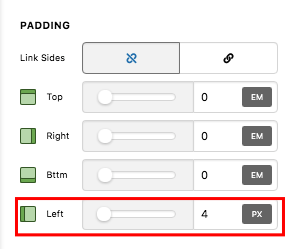
Thanks for the screenshot. To achieve that alignment, you can simply add a left padding in the Text element settings.

The Padding styling option in the Text element settings:
mk4JwTsFRuW0iWKbZ8TkcA

If you don’t see some of style options, you need to turn on the Advanced Mode by going to the Settings > Preferences > Advanced Mode

Best Regards.

Hi,

This hasn’t fixed the drift in alignment when the window is scaled to different sizes. If this not possible?

The page url is wearemaniac.com/about-us

Note that as the window is resized, the text block drifts out of alignment with the ‘work’ in the menu bar.

Cheers,
Connor

Hi @connorbennett,

It seems not possible due to the type of layout, the header is purely using flexbox for the layout and its alignment, and it’s the browser that decides the alignment and sizing depending on applied options.

I did some experiment with grid element, I set its layout to 1fr 1fr 1fr, then set a negative 2em left margin on the text element, and it works. Could you try checking it?

Thanks!

This topic was automatically closed 10 days after the last reply. New replies are no longer allowed.