Hi there,
I’ve created my Footer in the Footer builder, but when I’m editing a page, the footer doesn’t appear to be what I created in the Footer builder. How do I resolve this?
See image for example.
Thanks!
Hi there,
I’ve created my Footer in the Footer builder, but when I’m editing a page, the footer doesn’t appear to be what I created in the Footer builder. How do I resolve this?
See image for example.
Thanks!
Hello Craig,
Thanks for writing in! Does it looks different in the live view of the page too? You might be having some caching issue. I am assuming that you are using CDN. There might be some caching in the network and thus creating this issue. Please clear all your caches and test the footer again. If nothing is helping, provide us access to your site so that we can check your settings. Please create a secure note with the following info:
– Link to your site
– WordPress Admin username / password
To know how to create a secure note, please check this out: https://theme.co/docs/getting-support

Best Regards.
Yes, I viewed the live version in my staging site and it’s still doesn’t appear correctly. You can see the correct version in Pro Footer editor (currently assigned as Global) and compare it to Home v. A - New Design
Hello Craig,
I have investigated your site thoroughly. You were having this issue because you have accidentally placed margin-bottom: -150px; as the element inline css in the bar settings of your custom header.
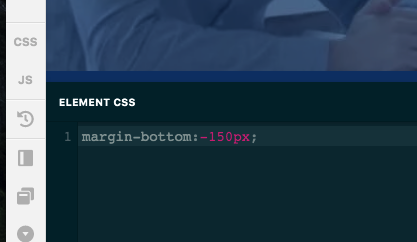
I went ahead and removed it already. The footer now displays correctly when you are editing the page in the Pro builder.
Kindly check your site now.
This topic was automatically closed 10 days after the last reply. New replies are no longer allowed.

