FontAwesome icons broken by updating X

Hi,

I recently updated the X theme for our website https://nexgenpharma.com.au. This seems to have broken the icons which I believe come from FontAwesome. I’ve attached a couple of examples:
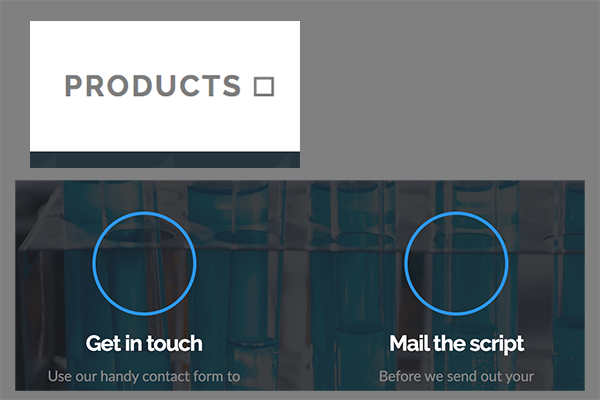
Screen Shot 2020-06-09 at 12.11.58 pm

From reading around the support forums, it seems like it may have something to do with CORS accessibility. I’ve followed the instructions here to update our .htaccess file, but it hasn’t worked.

Could you let me know what to try next? Happy to provide more info in a private message if needed.

Cheers

Hi Stewart,

I do not see any CORS policy error on the console of my browser when I check your website.
I wonder if the X theme was very old and if you used to add the font awesome manually?
If that is the case please kindly follow the steps mentioned here:

https://theme.co/forum/t/release-notes-pro-2-2-x-6-2-cornerstone-3-2/38234 (Please check the Font Awesome section.)

Finally, I suggest that you contact your hosting service provider if the CORS policy is the problem cause and they can help you solve the problem.

Thank you.

Hi Christopher,

I get an error with that link: “Oops! That page doesn’t exist or is private.”

We didn’t add FontAwesome manually, I think we first installed X around late August of 2019. Any icons used were available upfront in the Cornerstone editor. I believe (correct me if I’m wrong) FontAwesome is the foundation for this.

Is there something besides CORS that might be causing this?

Hey Stewart,

Yes. Please try checking if the Font Awesome Icon Weights are all disabled in X/Pro > Theme Options > Miscellaneous.

If that doesn’t help, please give us the following info in a Secure Note.

You can find the Secure Note button at the bottom of your posts.

Thanks.

Hi Stewart,

Thank you for writing in, you updated X to the latest version (7.2.3), but you leave Cornerstone behind (3.5.5). Please update Cornerstone to the latest version (4.2.3). You can easily update the Cornerstone by deactivating and deleting it, then follow the prompt to re-install Cornerstone on your dashboard, which should reinstall the latest Cornerstone since you already have the latest X.

Updating Your Themes and Plugins

Remember to clear all your caching features (plugin, server-side, CDN, and browser’s cache) after updating so that the code from the latest release is always in use. This will help you to avoid any potential errors.

Let us know how it goes,
Cheers!

Ah, I can’t believe it was so simple. Thanks very much for your help.

No problem, @rxpharma! It’s an easy thing to overlook. Glad to know everything is in working order now…cheers!

This topic was automatically closed 10 days after the last reply. New replies are no longer allowed.