The 3 flip cards at the bottom have the same size image and character count that is within 2 characters for each card.
The first card has 53, the second 52 and the third 51
Why is the last card appearing bigger?
The 3 flip cards at the bottom have the same size image and character count that is within 2 characters for each card.
The first card has 53, the second 52 and the third 51
Why is the last card appearing bigger?
Hi @lisacole1,
Thank you for reaching out to us. I checked your page and I believe this is happening because of the length of the words you have in each cards because some words are bit lengthy than other so they can’t adjust in one line therefore they drop down to the second line making that card bigger than others and also considerably large padding given to the back.
You can reduce the left and right padding of Back from to 6.5rem to 1rem this will also help you in fixing the words adjustment issue.
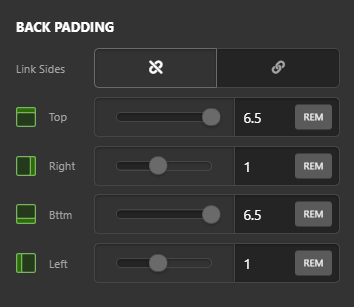
Hope this explains.
Thank you, that works so well!
I had trouble getting text over the top of a background image. Is there anywhere I can see how that is done please.
Is it possible to have a full size background image for each card? On a larger screen there is space either side.
I think it is something to do with front background lower layer size and position but I don’t know what options I have for those boxes. Where can I find those please.
Hello @lisacole1,
Did you add the image as a background image? If that is the case, the text should be over the top of the background image like this.

And to have a full size image, please make sure that you have inserted the full original image and then set the background image size to cover.
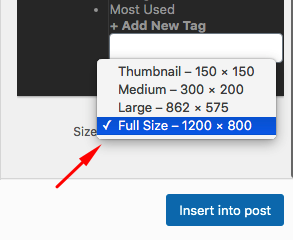
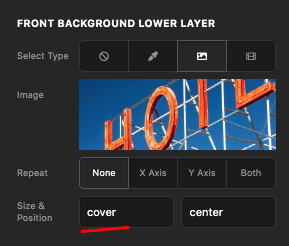
If nothing is helping, provide us access to your site so that we can check your card settings. Please create a secure note with the following info:
– Link to your site
– WordPress Admin username / password
To know how to create a secure note, please check this out: https://theme.co/docs/getting-support

Regards.
This topic was automatically closed 10 days after the last reply. New replies are no longer allowed.