You can try this out now in the RC release. Have a great day.
4 Likes
Very nice, it works. Thanks for adding this in now.
1 Like
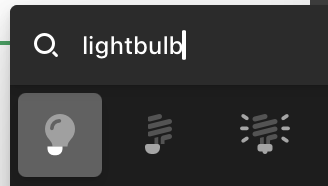
@Charlie one quirk I did notice is that some of the layers of the icons in the picker get shifted slightly. In this example, look at the lightbulb highlighted in the picker – note how the part that would screw in is offset from the bulb, but it looks fine in the blue shape to the left?



1 Like
Same here. Only seems to be these lightbulb icons?
I’ll get those lightbulb duotones in the icon picker fixed in the manual updates release. Thanks for sending my way. Glad you are enjoying the duotones.
Awesome, thanks! I did notice it affects others too. It was just particularly obvious with the lightbulbs.
My fix should work with all them, but feel free to reach out if you see issues after the release on Monday. Have a great weekend.
1 Like
I started playing around with it on a production site today, and noticed a related quirk.
It looks like that if I have an icon where I’ve set an explicit width and height, and then I try to adjust the size of the icon itself, it breaks in the way the lightbulbs were last week. Only, it stays broken on the front end in this case.
You can repro by:
- Putting a duotone icon on a page
- Setting a fixed width & height
- Then going back and change the size of the icon itself
At that point, the two layers will separate unexpectedly. And if you save and go to the front end, it will be visually separated there as well.
However, if you do things in a different order – where you increase the height and width of the icon before increasing the size, it doesn’t always break. Or if things are set to auto for height and width, it doesn’t appear to break.
Can you send a screenshot of the way your icon controls are setup? I can’t seem to recreate and that video doesn’t play for me.

Okay appreciate the picture I see the issue now. I can definitely fix that. Have a great day.
Great, thanks! Seems to mostly affect the icons that are wider than a square – so the TV one in particular gets hit weird. For example, if I make the icon 48, the width 48, and the height 48, it gets off center for the second layer. But if I then make the width wider to accommodate, it re-aligns.


Thanks for the info. I tested that scenario too and it’ll work once I release Pro 6.9.1.
1 Like
Can the docs be updated with current FA attributes and values for Font Awesome 7 integration? The current docs still refer to FA 5 and are missing the attributes for the newer styles. I use these quite often to add inline icons and custom list markers.
1 Like
I have updated the docs. Let me know if there is any other information you would like in our Font Awesome docs. Have a great day.