Essential grid lightbox navigation shows items twice when going to the next or previous item

Hi there,

I’m having some difficulties with essential grid. On my page, I have an essential grid of 6 pages, with the page content showing in the lightbox iframe on click. I would like to have navigation between these 6 pages inside the lightbox.

I’ve turned navigation on and it seems to work alright, except for one problem: when navigating using next/prev arrows through the iframes, every page is displayed twice.

For example, when I open the first page and keep clicking on next this is the desired order:
first page > second page > third page > etc…
However, the order I get is:
first page > first page > second page > second page > third page > third page > etc…

I’ve looked through a lot of documentation, but I just can not figure out what is going wrong.

I appreciate your help.

Hi Floris,

Thanks for reaching out.

We are really unable to understand your exact issue.

Kindly provide us access to your site so that we can able check your issue. Please create a secure note with the following info:
– Link to your site
– WordPress Admin username / password
- Provide the exact URL where you are having this issue

To know how to create a secure note, please check this out: https://theme.co/docs/getting-support

Thanks

You can see the issue on the homepage underneath the masthead, underneath the title “leer ons kennen”
When opening a lightbox and going to next and previous using the arrows the pages are shown twice

Hello Floris,

Thanks for providing the information. Please select “Filter Based Current Page” as the Gallery Mode. You may need to check out the documentation here:

We would love to know if this has worked for you. Thank you.

Hey,

I’ve tried all different gallery modes, including “Filter Based Current Page” as suggested by you. None of them have fixed this issue for me however.

Floris

Hi Floris,

To fix your issue about duplicated the items in the essential grid lightbox, follow the steps below.

1.) As what my colleagues said use “Filter Based Current Page” as the Gallery Mode
2.) Go to edit skin of each grid
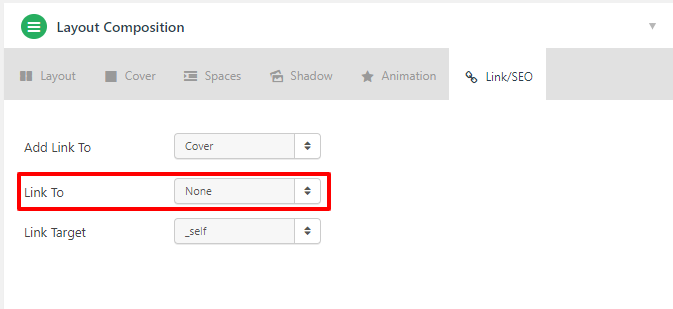
3.) On the edit skin page, under Layout Composition go to Link/SEO Tab, then set Link To to “None”
image
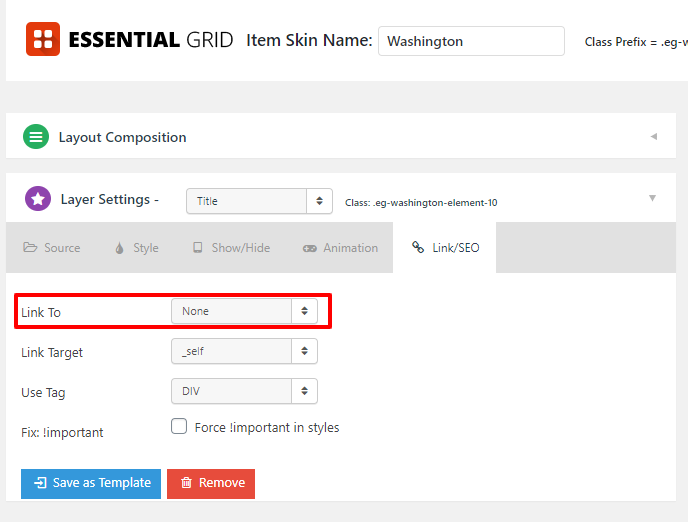
4.) Then on the edit skin page again, under Layer Settings go to Link/SEO Tab, then set Link To to “None”


5.) Then hit Save and it will fix the issue of the duplicated items in lightbox.

I hope it will help you fixed your issues.

Thank you.

Perfect, this solved it.
Thank you

Hi Floris,

We are glad that we are able to help you.

Thank you.

This topic was automatically closed 10 days after the last reply. New replies are no longer allowed.