How do I enable a top menu item to be clickable again after disabling it previously? I used the custom link URL from below support forum topic, but I’m not seeing it now to remove it.
Disable parent menu items, but keep sub menu items
Thanks!
How do I enable a top menu item to be clickable again after disabling it previously? I used the custom link URL from below support forum topic, but I’m not seeing it now to remove it.
Disable parent menu items, but keep sub menu items
Thanks!
Hello Nicole,
Thanks for writing in!
Please go to Appearance > Menus and edit your Menu. The Custom Links should be there in the left panel. If you are not seeing it, enable it in the Screen Options.
You may need to check out this page:
Hope this helps.
Thank you! The link was very helpful. I ended up removing the menu item and adding as menu item as page since I couldn’t find “Screen Options.”
Hello Nicole,
The Screen Options can be found at the upper right corner of the Appearance > Menus.
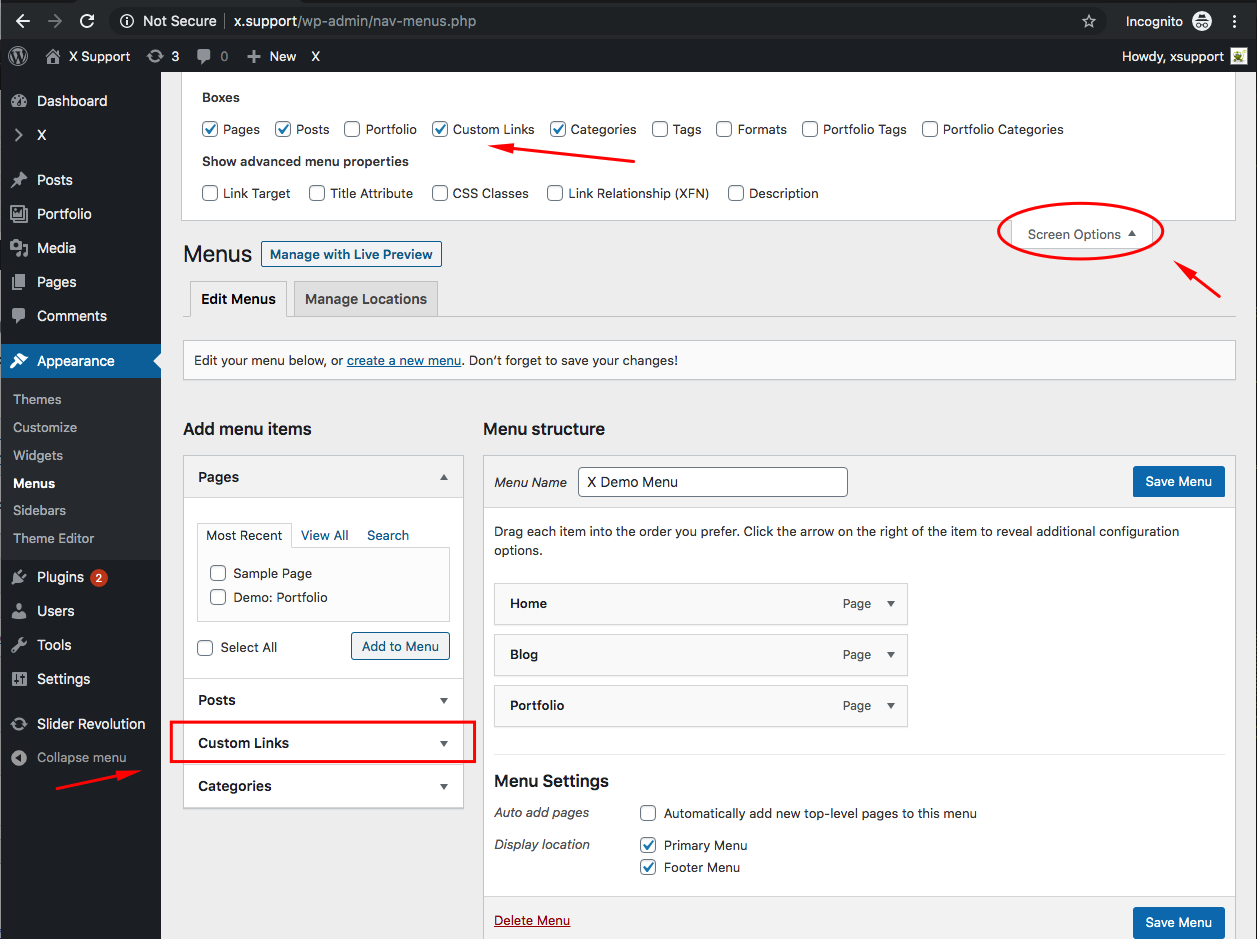
Hope this helps.
This topic was automatically closed 10 days after the last reply. New replies are no longer allowed.