Editing WPML Pages in Cornerstone

Hi there

For my two-language Website I purchased WPML Multilingual CMS as you sugested, because it is integrated in Cornerstone. I have set up the Italian version of my start-page. It is not finished translated yet but it appears, when I click the language switcher.

But where can I edit the Italian version in Cornerstone? If I edit the page with the plus icon in Wordpress, the layout of the Italian page is complete different than the german version.

What is the best way to translate the page with Cornerstone and WPML?

Thank you very much for your help!
Hi Felix,

Thanks for writing in! First of all, please note that the latest versions of WPML have some issues reported (our developers are still working on it), we recommend to use the following versions that are compatible with latest X/Pro themes.

  • WPML Multilingual CMS - 4.0.6
  • WPML String Translation - 2.8.6
  • WPML Translation Management - 2.6.7

With regard to Cornerstone integration with WPML, please check the following documentation (https://wpml.org/documentation/theme-compatibility/xtheme/).

Hope that helps.

Hi mldarshana

Thank you for your response. I think, I have installed the latest version, because I installed WPML yesterday. How can i get a older version like you said WPML Multilingual CMS - 4.0.6, WPML String Translation - 2.8.6, WPML Translation Management - 2.6.7

Thank you very much for your help.

Hi Felix,

You can get the copies from WPML Author or their site. And please check this related thread for proper setting https://theme.co/apex/forum/t/wpml-issue/48740. And from that thread, you’ll see Flag icons on the preview, that’s where you should switch the language within the builder.

Thanks!

Hi Rad

Thank you very much for your help! Everything seems to work fine now. Within the builder I see the flags and can copy my German pages and make the translation in Italian in Cornerstone.

Except, I don’t see the “Home” page when I click on the Italian Flag Icon in Cornerstone. How can I translate the Start-Page of my Website?

Thank you very much again for your help.

Hi @fbrugger,

Could you please share us with your admin account so we can take a closer look?

Thank you.

Hi thai

Thank you very much for helping me. Here comes the login credentials:

Thanks again!

Hi @fbrugger,

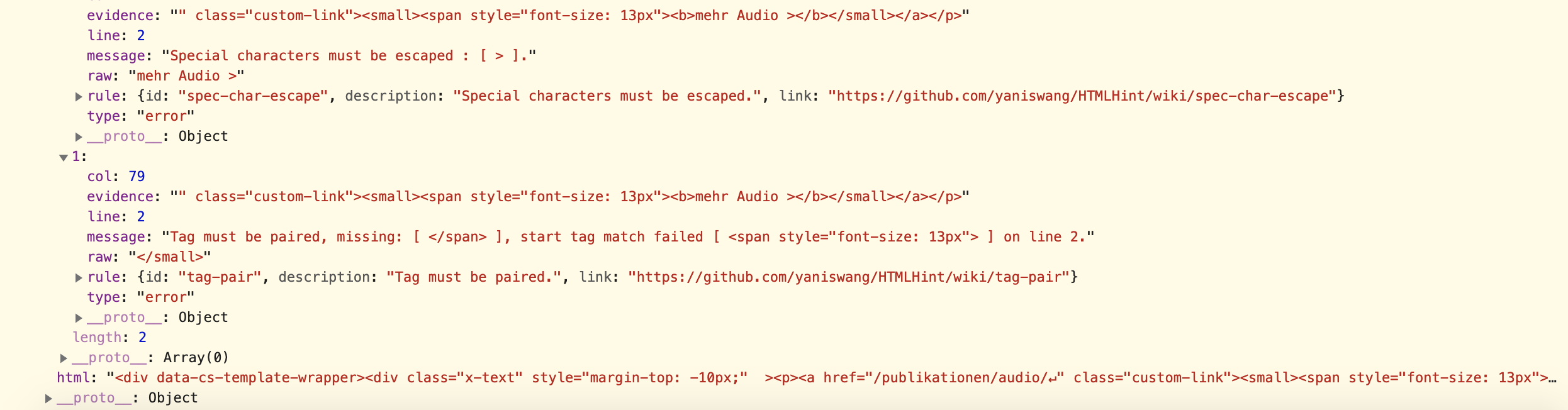
There are some HTML errors in the content builder(missing closed tags </span>, </div>, ...):

Please open the console log or check all your text elements and use this online tool to correct it:

https://htmlhint.io

Let us know how it goes!

Hi thai

Thank you very much for your great support. I still had the same problem as mentioned in this thread, from which I don’t know if this issue was solved:

But I was able to copy the German Start-Page in the page settings from Wordpress with WPML and duplicate the German Content. After this , the “Edit with Cornerstone” Screen appears and I was able to edit the Italian Start-Page in Cornerstone.

Thanks again for helping me!

You’re most welcome Felix,

I check your pages and cornerstone seems to work fine on both language.

Have a great day!

This topic was automatically closed 10 days after the last reply. New replies are no longer allowed.