Dynamic Variation ID and Attribute Output for Quote URL (Variable Products)

Hi Support Team,

We are currently using a custom WooCommerce Single Product layout and integrating your Woo Request a Quote functionality.

For variable products, the quote URL requires the following structure:

/?attribute_{attribute_key}={attribute_value}&variation_id={variation_id}&add-to-qtsquote={product_id}

We are able to dynamically output the product ID using:

{{dc:woocommerce:product_id}}

However, we need guidance on how to dynamically output:

  1. The selected variation ID
  2. The selected attribute key (e.g., attribute_style )
  3. The selected attribute value (e.g., C )

Could you please advise:

  • Is there a recommended hook, function, or dynamic tag to retrieve the currently selected variation ID?
  • Is there a built-in method to output selected attribute key/value pairs for the active variation?
  • Is there an official way to generate the correct quote URL for variable products?

We want to ensure compatibility with your plugin’s expected structure.

Second questions: is there a way to check if a product has variation or not?

Thank you.
Hello @sbxstrategies,

Thanks for writing in!

One thing to keep in mind is that the dynamic content will not respond to an AJAX or JavaScript event. Every time you select a variation, the variation key, variation value, and ID will change. Regretfully, the dynamic content will not respond to these changes. It will remain what is rendered as the page is loaded. What you will need is a JavaScript code that triggers when a variation is selected. Be advised that custom JS coding is beyond the scope of our support. You may need to contact a 3rd party developer to be able to implement this.

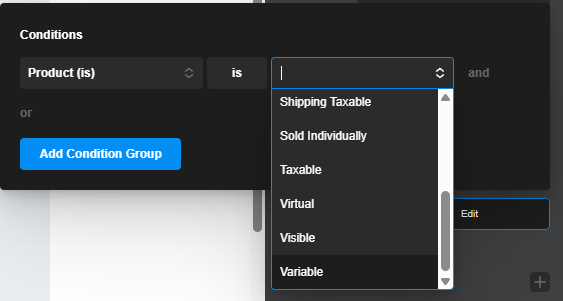
If you want to check if the product is a variation or not, you can use the “Product Is” condition as shown below:
image

Best Regards.

Are you saying that X Theme’s dynamic content cannot retrieve or update the selected variation key, variation value, or variation ID in real time when a user changes the variation? In other words, since variation selection happens via AJAX/JavaScript after the page loads, there is no built-in way in X to dynamically capture those updated values without writing custom JavaScript?

And just to clarify further, is there any supported method within X (without custom JS) to access the currently selected variation data, or is custom JavaScript the only viable solution if we need real-time variation information?


At the moment in X, the Add to Cart Form element includes the quantity field, attribute selectors, and the add to cart button all bundled together.

Is there a way to separate these into individual elements?

I understand that creating a standalone Add to Cart button is relatively straightforward, but is it possible to output the Quantity field and the Attribute (variation) selectors as separate elements within X?

Hello @sbxstrategies,

1.) Yes, Dynamic content cannot retrieve or update the selected variation key. Kindly check this out:

The dynamic content gets rendered internally by PHP upon page loading.

2.) Yes, only custom JavaScript or AJAX is the solution for real-time variation information.

3.) The Add to Cart Form element is a prefab element that you can use in the WooCommerce Single Layout to display variations along with the add to cart button. Regretfully, there is no other element to display the add to cart, quantity field, and the variations that update in real-time upon a user change.

Hope this helps.

This topic was automatically closed 10 days after the last reply. New replies are no longer allowed.