No, that doesn’t help. Before I contact you, I always try to search the documentation, the forum, and even the source code to find an answer.
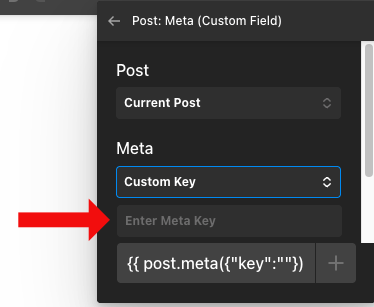
But as I see it, there are a few things happening in the post meta field example that cannot be found in the PHP files. What I found is that you seem to have defined a predefined control field for postmeta.

This appears to be filled with values in PHP as well.
But the real magic, which is that you can enter your “own meta key” and an extra field appears if you can’t find the right one in the list, seems to take place in (minimized) JavaScript! But this is almost impossible to read due to the minimization!

The documentation is still quite sparse when it comes to the possibilities of the Dynamic Content API and understanding what actually happens in the background.
To clarify once again, I would like to create a select field where you can specify your own key, just like with postmeta, if you don’t have the right one in the list.
The basic field already works, except for the missing “Custom Key” option.
public static function REGISTER_FIELD (string $group_name, string $field_name)
{


	$wp_subsizes = get_intermediate_image_sizes ();

	foreach ($wp_subsizes as $subsize)
	{
		self::$o_image_metakeys[]	= ['value' => 'sizes.' . $subsize . '.width',	 	'label' => 'Subsizes - ' . $subsize . ' - Width'];
		self::$o_image_metakeys[]	= ['value' => 'sizes.' . $subsize . '.height',	 	'label' => 'Subsizes - ' . $subsize . ' - Height'];
		self::$o_image_metakeys[]	= ['value' => 'sizes.' . $subsize . '.file',			'label' => 'Subsizes - ' . $subsize . ' - Filepath'];

	}


	cornerstone_dynamic_content_register_field (['group' => $group_name,
																'name' => $field_name,
																'type' => 'mixed',
																'label' => 'Image Meta',
																'controls'	=> [	[	'key' => self::FIELD_IMAGE_ID,
																							'type' => 'text',
																							'label' => 'Image ID',
																							'options' => ['placeholder' => 'Image post_id']
																						],
																						[	'key' => self::FIELD_OPTION__IMAGE_METAKEY,
																							'type' => 'select',
																							'label' => 'Meta',
																							'options' => [	'choices' => self::$o_image_metakeys,
																												'placeholder' => 'Image Meta select']
																						]
																					]

																]);

}
And it would be awesome if we could use the wp media browser for select images and it’s id’s!