Hi,
I have downloaded demo content from Design Cloud but don’t know how to activate to my X theme.
Can’t even find X -> Overview section on the theme.
Can you please advise?
Hi,
I have downloaded demo content from Design Cloud but don’t know how to activate to my X theme.
Can’t even find X -> Overview section on the theme.
Can you please advise?
Hi @kkotjib,
Thanks for reaching out.
Once you install the demos, the assets are available on your website, you just need to use those. You can find the option Use Template or Load Template in the builder.
You can learn more about how to use the design cloud assets from here: https://theme.co/docs/template-manager#what-is-the-design-cloud
Hope it helps.
Thanks
Hi,
How did you get into the menu of “Create Header”?
I’ve been searching the menu but not found on my theme.
Hello @kkotjib
It seems that you have Installed the “Creative Column 2”. You can see this template in the Template manager
X--->Template
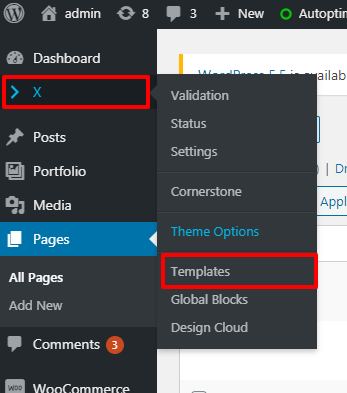
Here you would see the available templates that you have installed
To use these templates in your page. Please follow these steps
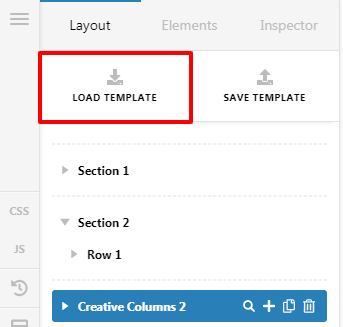
Go to the Pages and Edit with Cornerstone
Click on Load Template
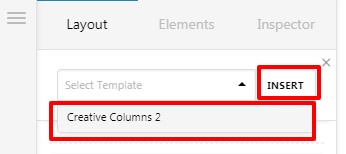
Select the template from the select box and click on the Insert button
Hope it Helps
Thanks
This topic was automatically closed 10 days after the last reply. New replies are no longer allowed.


