CS Forms Redirect

Hi,

I can’t get my form to redirect to a Div on the same page.

I have an element which appears on successful submit (which works) and the form is hidden after submit (which works). The URL after the submit is still the same page, without the #success on the end.

I’ve cleared the cache and been around in circles.

Help!

Hello Bill,

Thanks for writing in! The DIV “#success” should not be hidden upon successful form submission. We would be happy to double check your site if we can log in. You can create a secure note in your next reply with the following info:
– Link to your site
– WP login URL
– WP username
– WP password
– WP Administrator Role
– Confirmation that we can access and make changes to your site

To know how to create a secure note, please check this out: How The Forum Works

image

Best Regards.

I figured that was important so I put the anchor tag on the Section surrounding the form. Login added.

The form is supposed to save each submission into a CPT called Website Enquiries. Even that is unreliable.
Please go ahead and investigate and fix if you can.

Hello Bill,

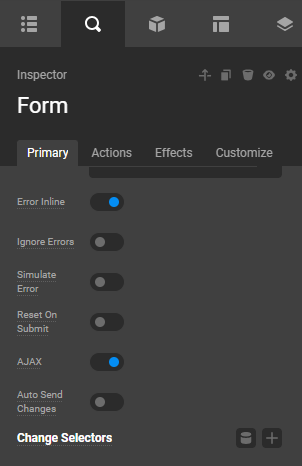
Since you want it to redirect to the DIV that contains the FORM on the same page, it is best to enable the CS Form’s AJAX feature instead.
image

Kindly let us know how it goes.

Hi Bill,

Seems like you have withdrawn your post. Do let us know if you need any further assistance.

Thanks!

Actually, I arrived at the point where the form seemed to work, then silently failed. I check the error log and the console log, nothing to see. Really frustrating that there’s no sign of why it would sometimes send email and save to the CPT and then sometimes fail.

I’ve gone back to Gravity Forms, it was just easier. Bill.

I have the same problem, and unfortunately I still have to use additional extensions even though CS Forms (which isn’t free) should, in theory, allow me to use or install other form extensions.

For now, CS Forms is an unfinished product that’s expensive for an uncertain return on investment…

Hey @Richardz and @bill_hodgson,

Thank you for your feedback. Can you guys send us a video of what’s happening in order for us to improve Cornerstone Forms?

Hi, @christian

What you would see is me entering fields in a form, clicking Submit, the confirmation message and then nothing.

For a while the form worked, and now it doesn’t so I’ve replaced if with GF as I can’t spend more time on this.

What I recommend is providing some sort of log showing what the form is doing as it executes the actions, without which it’s guesswork.

Right now I have to get the site live for the end of next week so won’t be spending time on CS Forms, but perhaps once this is on the live server I can swap the forms back and you can login to experiment.

Best wishes, Bill.

Hello Bill,

Please check out the video in the secure note below.

Thanks.

HI Rue - your help did indeed cause the redirection to work. But then the form stopped sending emails or saving to the CPT, in the actions for the form. Having looked in the error log and console log, I found nothing.

At one point there were lots of console errors, due to including Turnstile in the form. I have valid keys, it just caused lots of errors, so I removed it.

At this point the form visually worked, but didn’t emit any data, and I switched back to Gravity. I’d really like the form to have a logging option to debug what’s happening.

Thanks for the video, Bill.

I will check it out, and maybe we can find out why it is not saving the data.
You are most welcome, Bill.