Hi Onaje
Kindly open up new threads for additional questions as it will help us to focus on each issue and give you a better support which you deserve. Having a long thread makes the maintaining job harder and also it will be harder for the other customers to find the correct information if they have similar issues. You are always welcomed to reply to this thread to follow up the same question.
Please go to the post in question and in the edit screen scroll down to see the Body Class (CSS) option. Add the class of fullwidth there:
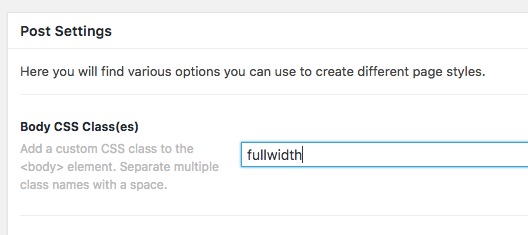
Then, go to Pro > Theme Options > CSS and add teh CSS code below:
.fullwidth #x-site > .x-container {
    max-width: 100%;
    width: 100%;
}
1- I have found the proper CSS code selector using the Chrome browser Developer Toolbar:
https://www.youtube.com/watch?v=wcFnnxfA70g
2- For the CSS code itself, I suggest that you get started with this tutorial:
https://www.youtube.com/watch?v=yfoY53QXEnI
From now on, whenever you add the fullwidth class in a post body Class option it will make the page full width.
Thank you.


