Cornerstone Image Size Bug 2

Hi, I have a retina image that I want to be full width. It is 3840 wide. In Cornerstone I got it to show at 100% width. But in Chome and Safari it’s only showing at 1100px wide (according to the rendered code). So weird.

I’ve looked through the other threads and tried everything with no luck. No containers… 100% width and max width… I know how to code this on normal websites. So please take a look? Login below.
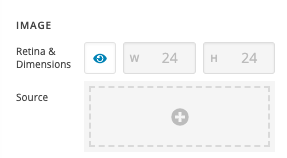
Hi Nathan,

Please kindly change the element from Classic Image and use the Image element. There you will have an option to enable or disable that Retina related half-size feature by clicking the eyedrop icon:

Kindly, click here for more information about the Image Element.

Thank you.

Hi. I am using the Image element.

This isn’t related, unfortunately. We are counting on you to help us with this. If there’s something that isn’t clear about my original post, please let me know.

The issue is that we want the first image to be full-width. I will link to the URL in a secure note so you can see the HTML. Adding the CSS style width=100% to the image doesn’t fix it.

The image shows 100% width in Cornerstone, but not in any browser!

In the secure note I will also attach screenshots of Cornerstone vs the browser.

Thank you.

Hey Nathan,

Your image being resized in the front-end is not Cornerstone’s doing. It’s because of a third-party plugin, Jetpack. Specifically, it’s because of its image optimization module. Please uninstall Jetpack.

Before submitting an issue, please it’s important that you first test for a plugin conflict so you know if one of our products is causing the issue. You can do that by deactivating all third party plugins, and seeing if the problem remains. If it’s fixed, you’ll know a plugin caused the problem, and you can narrow down which one by reactivating them one at a time.

Hope that helps.

That fixed it!

Sorry, I had no idea that Jetpack was messing with image sizes. What a nonsensical thing for them to do.

You’re more than welcome, glad we could help.

Cheers!

This topic was automatically closed 10 days after the last reply. New replies are no longer allowed.