Cornerstone Forms - newbie issues

I’m using Cornerstone forms for the first time on a new project. I’ve always used Gravity Forms, so this is exciting.

I’ve been watching the Youtube videos, and I think I’m replicating what he’s doing in the video, but I’m having two issues with the Tippet Contact Form:

  1. It’s not submitting the data to Cornerstone > Forms Submission on the back end even though Ajax is selected
  2. It’s not emailing me a notification, even though I have that set up.
  3. Instead of the conditional thank you message appearing, it seems to be redirecting (even though I’m not using the redirect action) and it’s landing at an unknown page message, even though the URL is still the same /contact/ URL.

Help!
Hey @capodanno,

Thanks for writing in! Update the Cornerstone Forms to version 1.0.5. And for reliable delivery, connect your WordPress site to a trusted email provider using a plugin like WP Mail SMTP. For more details about the Email Action, check this out: https://theme.co/docs/cornerstone-forms-actions

Kindly let us know how it goes.

I already had version 1.0.5

Your link to information about forms actions did not answer any of my 3 questions. I’ve provided sign in details in the secure note… is it possible to look around and see what settings I’m missing that may be causing my issues?

Please feel free to test and you’ll see the issues I’m describing.

If not, I’ll go back to Gravity Forms.

Hey @capodanno,

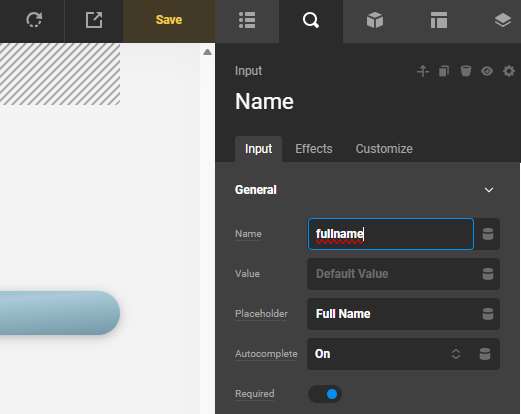
I investigated the form and it turns out that the Name Text input is having a conflict. Renaming it to something else resolved the issue.
image

Check your Contact page now.

That’s funny, i just opened a new topic yesterday with the exact same questions/issues I ran into.

Hello @xoa,

Yes, that’s true. This becomes quite a common issue since most users would use “name” for the Name field.

Cheers.

This topic was automatically closed 10 days after the last reply. New replies are no longer allowed.