Component parameter: Open link on new tab

Hi,

Im using button components with a set of parameters.
I found a way to add the open on new tab and it worked for a while, but now it doenst work.

How can i solve it?

"target" : {
            "type" : "choose",
            "label" : "Target",
            "initial" : "_self",
            "options" : [
              { "value" : "_self", "label" : "_self" },
              { "value" : "blank", "label" : "_blank" }
            ]
          }
}

image

Hello @CulturalInfusion,

Thanks for writing to us.

It seems that there is an issue with your option value. I would suggest that you please set the _blank, not blank. Please clear your browser cache and recheck it again.

Hope it helps
Thanks

Hi @prakash_s,

Yes, there was that issue indeed. But i fixed it, clean browser, cornerstone and plugin cache and the issue (not opening on a new tab) still persists.

What am i missing?

Hey @CulturalInfusion,

We would be happy to double-check your Component element if we can log in. You can create a secure note in your next reply with the following info:
– Link to your site
– WP login URL
– WP username
– WP password
– WP Administrator Role
– Confirmation that we can access and make changes to your site

To know how to create a secure note, please check this out: How The Forum Works

image

Best Regards.

Hi @ruenel

Website is currently blocked.
Let me get back to you tomorrow with working credentials.

Sounds good! No worries at all.

We’ll be ready whenever you are. Whenever you have the working credentials tomorrow, just drop them here and we can pick up right where we left off.

Have a great rest of your day!

Hi @christian

See secure note.

Hey @CulturalInfusion,

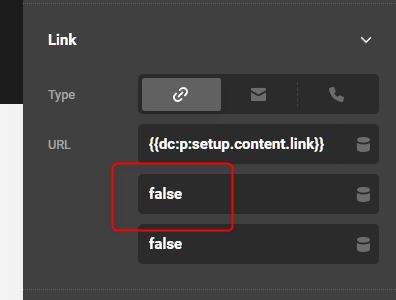
The New Tab is not yet set in your Component.

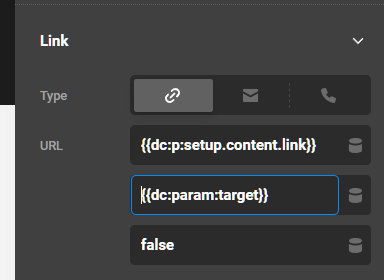
To set the parameter value in the New Tab, you first need to enter the Breakout Mode (see https://theme.co/docs/dynamic-content#using-breakout-mode) so the checkbox UI because a text field. Your parameter value, by the way, should be true and false. true to open the link to New Tab and false to open to self.

image

image

Oh makes total sense.
These params are so powerful, yet so tricky to build.

Thank you, @christian

You are most welcome, @CulturalInfusion.

Hi @ruenel,

I´m back to this subject, because im running into the same issue, but the other way around.
I guess i didnt test properly to see if blank or self were working properly. I only saw the link opening on a new tab and a call it a day. My bad.

Now that i tested, all buttons are opening on a new tab. I´m very confused.
I tested the param code as suggested {{dc:param:target}} and i even tested (like the other params i have) {{dc:p:target}}, but none worked.
What am i missing?

Can you help?

Hey @CulturalInfusion,

Can you give us the URL of the page where a button is not working. Also, provide a screenshot of the button so we know what to look for.

Thanks.

Hi @christian, please check this thread.
I sent all necessary details on my last secure note.

Hey @CulturalInfusion,

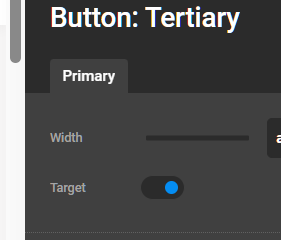
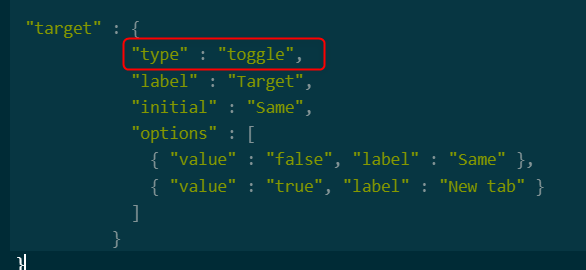
Sorry for my forgetfullness. There needs to be a small but significant change. The UI type should be changed to Toggle.

image

image

By switching to the toggle, the parameter now outputs a real boolean false or true and so the target works.

Hi @christian
Thank you. Seems to be working.
But it was not working just by changing it to toggle.
I had to change the code inside the URL field from {{dc:param:target}} to {{dc:p:target}}

Hey @CulturalInfusion,

It is good to know that it is already working for you.

Best Regards.

This topic was automatically closed 10 days after the last reply. New replies are no longer allowed.