Change text and image on share documents/social/mail

Hi when you share a portfolio

https://mauroborgarello.com/PMA/portfolio-item/prontozink-cumarina-elastic/

You have no image on sharing by facebook and linkedin and on mail the precompiled text
“Hey, thought you might enjoy this! Check it out when you have a chance:”

Is there a way to

  1. insert a social sharing image (even a standard logo of the image of portfolio)
    2)chenge the standard text on sharing by mail

tnks!

Hey Mauro,

Thanks for writing in.

My apologies but I don’t seem to get what you are trying to ask in the first part. Would you mind clarifying it?

As for the second item, that is possible but that would involve a bit of customization.

Please install and activate the child theme and login through FTP then edit the functions.php then add this code:

// Translate Strings
add_filter( 'gettext', 'translate_x_strings', 20, 3 );

function translate_x_strings( $translated_text, $text, $domain ) {

        switch ( $translated_text ) {

            case "Hey, thought you might enjoy this! Check it out when you have a chance:" :

                $translated_text =  __( 'ADD THE REPLACEMENT TEXT HERE.', '__x__' );
                break;
        }

    return $translated_text;
}

Please replace ADD THE REPLACEMENT TEXT HERE in the code above with the text you want to use in the mail body.

Hope this helps.

ok text on mail sharing is translated correctly now tnks!

This is what I mean by adding the image when sharing a post on fb or linkedin
when i share a document on social to have the image on the post…

Hey Mauro,

The function that takes data like the image from your site is called Open Graph. Our themes do have a simple Open Graph feature which can be enabled in Theme Options > Social > Open Graph. It will then show the Featured Image of a page or post when their URL is shared in sites that support Open Graph like Facebook.

Aside from the Open Graph switch, our theme has a Social Fallback Image feature which can be configured in Theme Options > Social > Social Fallback Image. For more details, please see the Info of the option.
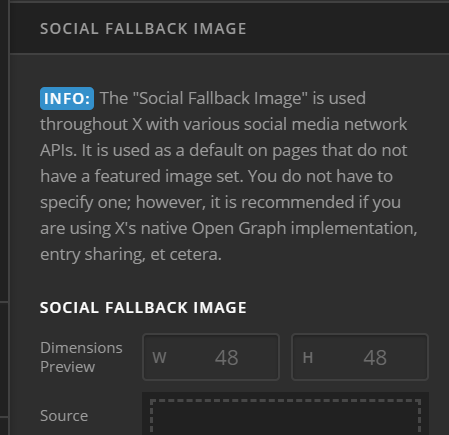
You should only use 1 Open Graph system in your site to avoid conflicts. If you’re using Yoast SEO which has its own Open Graph options, you must disable the Open Graph option of our theme and use Yoast SEO’s OG options solely instead. In this setup though, you’ll need to contact Yoast SEO support or the plugin that has OG options because, at this stage, it is the third-party plugin that is responsible for the OG setup of your site.

With all that said, if the Featured Image of your page is not showing up on Facebook, chances are there’s an Open Graph conflict in your site. What you can do is either disable our theme’s OG or deactivate all third-party plugins or plugins that have OG options.

Hope that helps.

Perfect! tnks!

You’re most welcome!

This topic was automatically closed 10 days after the last reply. New replies are no longer allowed.