I’ve seen other people post this issue, but the fixes that work for them haven’t worked for me. Using Pro 1.2.4.
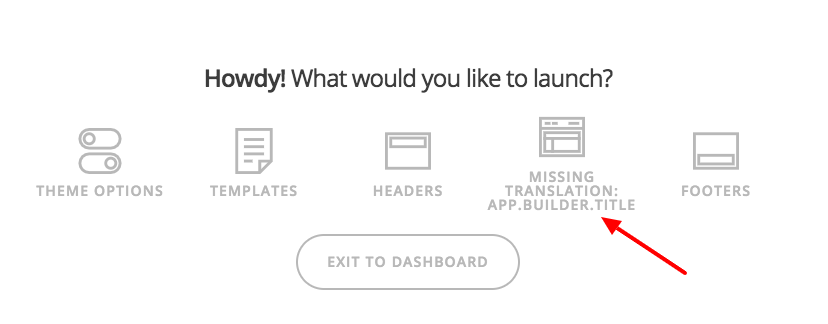
When I launch Pro, the Content Icon shows “Missing Translation”, and clicking it throws a JS error: “Requested component ‘Page_Builder’ does not exist.” The content never loads.
Other people have suggested that clearing all caches has fixed this for them. So far I’ve:
-Disabled W3TC
-Set CloudFlare to Developer Mode
-disabling all other plugins
-Cleared browser cache
-Tried other browsers I’ve never used to access the site.
-Created a new user in the WP installation, and logged in as that user
The problem persists.
HOWEVER, when I cloned the Application in Cloudways, and hit that application, everything worked fine.
I suspect it’s a caching issue somewhere, but I’m out of ideas to check.
Any ideas?
Thanks
Hello There,
Thanks for writing in! There is a related thread here:
In that thread, it seems that the user is using CloudFlare and the minify feature. After he disabled the auto minify scripts in CloudFlare, the issue was resolved. Could you also please check your settings and disable that.
Please let us know how it goes.
The auto minify feature is turned off in Cloudflare (I’ve never turned it on, because I read of some issues it caused in cornerstone). Any other thoughts?
Thanks
Sean
Hey Sean
Could you please give us access to your site and to your CloudFlare so that we can investigate further?
Thank you in advance.
Added a secure note on my last reply.
Thanks
Sean
Hi Sean,
Thanks for supplying those details, I’ve been doing some testing and have come to a theory in the end.
You mention it works perfectly on a new install of Cloudways which points to caching being an issue somewhere along the line. Here’s a brief breakdown of what I checked and what I believe the issue is:
1: CloudFlare settings, overall your CloudFlare settings look good. You have excluded the builder via the page rules, minification isn’t turned on so that all looks fine. For testing purposes I still set it to development mode, though as expected it didn’t make any impact.
After this I moved onto
2: Your W3 Total Cache settings. Basically W3 Total Cache is a beast of a plugin and it’s very easy to setup incorrectly. There were a few takeaways from this:
- You have minification enabled in W3, but the assets from Pro aren’t excluded. If minification is enabled assets should be excluded. As Pro already serves minified assets, re-minifying assets is likely to break an aspect of the theme.
- Database caching is enabled with Memcache. Can you confirm Memcache is actually setup on the database itself? If it is, please ask Cloudways to force clear the Database based caching, as I believe this is where everything falls down.
Now I know you’ve mentioned trying with W3 Total Cache disabled, but sometimes disabling the plugin doesn’t actually disable it. Please try the following steps and see if this helps.
- Purge all caches within W3 Total Cache
- Disable W3 Total Cache globally.
- Set CloudFlare to Development Mode
- Get Cloudways to force clear any caches on their end. This includes Varnish and other form of caching (database or otherwise).
- Remove the code W3 Total Cache adds to your .htaccess
- Remove the define W3 Total Cache adds to your wp-config.php
Now try loading the builder again in a Chrome Incognito window and see if it loads correctly. If it still doesn’t, try disabling your SEO plugin. That throws an error in the WP Admin area, though it doesn’t appear to on the front-end it may still be causing an issue.
If it still doesn’t work after the above, please let us know.
Thanks!
Jack,
Thanks for the thorough and detailed breakdown. I did all of the above, including nuking memcache by restarting it through the cloudways control panel and purging the Varnish cache.
There wasn’t anything in wp-config.php for W3 Total Cache, even though there should have been.
In the interest of covering my bases, I also restarted Apache and PHP FPM through the Cloudways control panel, just in case one of those was holding onto .htaccess settings from W3 Total cache.
I disabled Yoast as well.
Unfortunately, still no luck.
I was going to try upgrading to 1.2.5 to see if that gave a different error message (based on the changelog it looks like it might), but the upgrade disappeared from my upgrades page. It was there one minute, then gone the next. Odd.
As a last resort, I can try cloning the application in Cloudways, and swapping my dev and production URLs, to see if that works. I’m hesitant to do that, since every time I’ve tried it it’s resulted in a couple hours of very unpredictable behavior on the site.
Any other thoughts?
Thanks
Sean
Nevermind. I gave up and cloned the app. After letting the dust settle for a few minutes, it’s working now.
I’m going to chalk this up to something weird that I’m not likely to understand and move on with my life.
Thanks again!
Sean
Ok sounds good. Glad to hear you have something that’s working right now.
This topic was automatically closed 10 days after the last reply. New replies are no longer allowed.