Blog not reflecting choices in theme options blog settings

Hi!
I’m still working on this site:
https://designedbydean.com/blog and the blog page is not showing the masonary layout with the 2 columns or more than three posts at any time even though the setting should show different.

I followed all the suggestions in this post https://theme.co/apex/forum/t/blog-options-3-columns-title/46404/2

Expect when I did the htaccess.bak edit I could no longer access the wp-admin dashboard to save the permalinks, I only got a 500 http error.

I did not remove the woo commerce css either as it had nothing to do with the blog. Can you help me out here?
Hi Ariell,

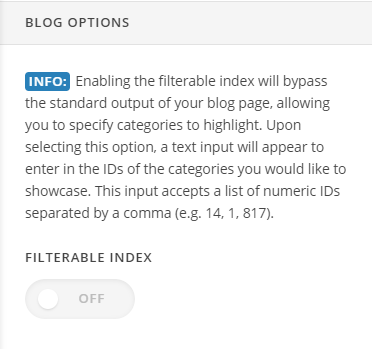
Thank you for reaching out to us. When the Filterable Index is turned on, it does not display masonry layout to give way for the filterable index which is a unique feature in ethos.

Navigate to Theme Options > Ethos > Blog Options > Filterable Index and turn it off to show the Masonry layout (see screenshot)

Cheers!

Awesome! that simple! huh, thank you very much! Support team is awesome too btw!

You are most welcome!

This topic was automatically closed 10 days after the last reply. New replies are no longer allowed.