If you have a global color palette set and choose one of your colors for borders, the rgb shows correctly but the border renders gray in the preview. Even after refresh, the border renders gray or black. To solve, you need to manually pull the color selector away from your global color rgb and then manually add the rgb values back in.
Hi Josh,
Sorry for the delay here. Any particular elements you’re seeing this with? I tried a few and can’t reproduce it. Thanks!
I’m seeing something kind of like this on the Accordion.
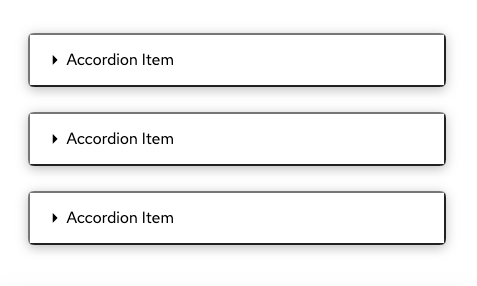
Just putting the default accordion element on the page, it’s got some sort of inset border applied to it.
In Safari, it puts the border on the right and bottom and inverts when clicking (like the second one in this screenshot)
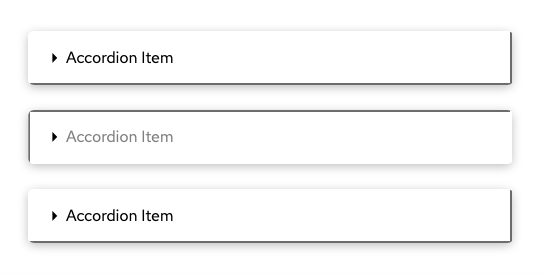
In Chrome, it seems to put borders around the whole thing.
There are no border set when I inspect the elements.
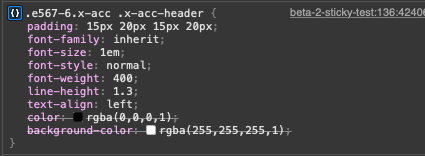
I’m guessing this is a side effect of the new ability to turn off the border controls with the new toggle. In the previous releases, the default element seems to have set a border of 0.
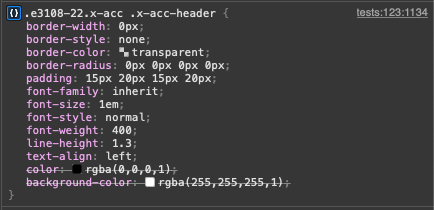
Looks like the browser’s default stylesheet is kicking in and adding a border because one isn’t set explicitly on the [button]?
Thanks Devin! I’m thinking this is a different issue, but we’ll look into it as well.
Believe I figured out what was going on in my original post. User error 
- Was working in two builders simultaneously - content builder and header builder
- Header builder didn’t have colors set yet. Content builder did.
- Every time I saved the header I was working on, it overwrote the color palette in the database
- The colors still showed up in the content builder but the preview loaded transparent.
@DoncoMarketing, oh gotcha! Thanks for clarifying this. It sounds like a common workflow so I’ll be thinking of anything we can do to improve that. One idea would be not saving colors unless a color actually changed, and syncing the colors whenever a save happens.
1 Like