I have a couple of header images on my site where the text isn’t clear. We’d like to add stroke effect (text outline) to the headings over those images. Is there a code that will allow us to do that?
Can that code also be set up so we can change the color of the stroke?
Hi Jon Bryan,
Thanks for reaching out.
Can you please provide your website URL link so that we can take a look.
Please create a secure note:
– Link to your site
To know how to create a secure note, please check this out: https://theme.co/docs/getting-support
Thank you.

Thank you.
https://swantech.ca/clean-safe-workplaces/ is the page I’m working on right now, there will be others that will come shortly. I have a completely different reply box to what you are showing (it’s actually 2 boxes side by side - 1 I type in the other displays my response). I don’t have the bottom menu you are showing so can’t do the secure note thing.
Hi Jon Bryan,
Thank you for providing the URL of your website. To address your problem please add the CSS code below:
.x-main .content > .vc_row .vc_column-inner h1 span strong,
.x-main .content > .vc_row .vc_column-inner h2 span strong {
text-shadow: -1px -1px 0 #000000, 2px -1px 0 #000000, -1px 1px 0 #000000, 2px 2px 0 #000000;
}
Here is a helpful link about text-shadow
To change the color of the shadow just change this hex code “#000000” in the css to your desire hex color, please check the link here for the available hex code.
I hope it will help you solve your issue.
Please note that providing custom code is outside the scope of our theme support. Issues that will arise from the use of custom codes should be forwarded to a 3rd party developer.
Thank you.
No problem with hex codes etc . . . but, where would I add the code?
Hi Jon Bryan,
Please add the css code X/Pro > Theme Options > CSS
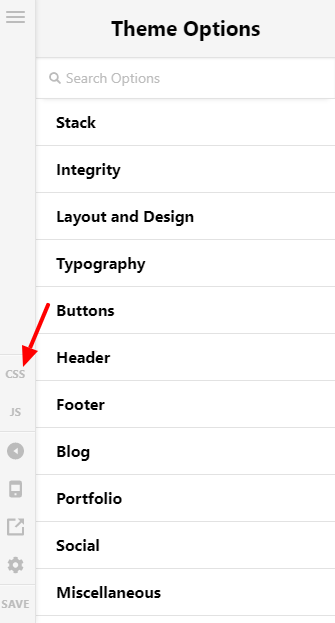
I hope it will help you.
Thank you.
Didn’t do anything. But, I’m confused here. I’m going to require different stroke colors on different headings, depending on the background. How would this fix handle that? It looks to me that, if your fix worked all headings throughout the site would then have the same color stroke.
Hello Jon,
Please have the code updated and use this instead:
.x-main .content > .vc_row .vc_column-inner h1 span strong,
.x-main .content > .vc_row .vc_column-inner h2 span strong {
    text-shadow: 1px 2px 5px red;
}
The outcome will be like this:

I used a red color to easily spot the changes. Feel free to change it to your desired color. To learn more about the text shadow property, please check this out:
Feel free to make adjustment as you need. Here are some related links for further reading, this could help you in finding and implementing some CSS fixes:
- Intro to CSS - https://goo.gl/mFuWQT
- How to get CSS selectors - https://goo.gl/BmoH39
- Get Started With Viewing And Changing CSS - https://goo.gl/7xFhDa
- CSS Media Queries - https://goo.gl/L3ZHNg
This topic was automatically closed 10 days after the last reply. New replies are no longer allowed.