Hi I was wondering if it’s possible with a bit of coding to feature pages or categories on the carousel (ethos) instead of only blog posts. Thanks
Hey @klelietta,
Regretfully, that will involve template customization. I can point you out to the template you need to edit but it’s best to have a developer do this and maintain the custom codes in your site as we do not offer theme customization as part of our theme support.
The template you need to override is _post-carousel.php. That’s located in pro\framework\legacy\cranium\headers\views\ethos
Create your own args to WP_query
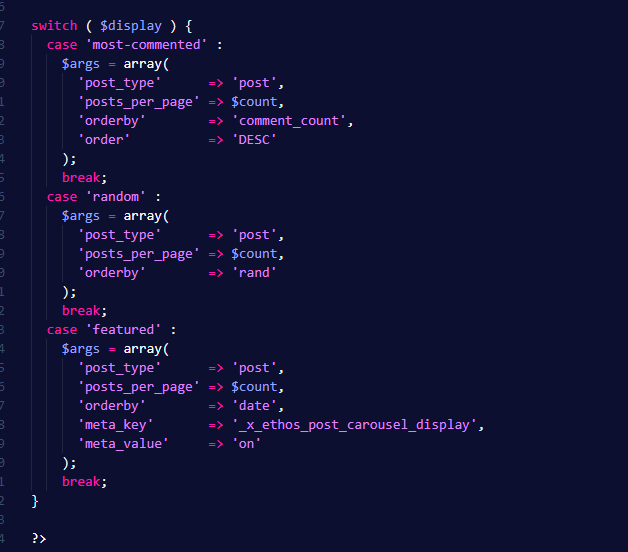
Hope that helps.
Thanks , yes I have a guy trying to do some changes, I only wanted to know if it was possible at all. Thank you
Hi
we found the directory etc, I was wondering, do we necessarily have to override or we can create a new PHP file with the different settings?
Also if I create my own args and I put “category” in it instead of “random” etc, it is correct or the theme needs a specific name for the category?
Last question very important. In the article you link with the guidance it says we need to modify the child theme. But when I go to the directory, the whole path (pro/framework/legacy/cranium/headers/views/ethos) is only on the main Pro directory.
If I go to the child -Pro it stops to framework/views.
Which one do we need to override? Thanks a lot
Hi @klelietta,
1.) I suggest that you will just override the files and just add your customization
2.) You can create your own args, the theme doesn’t need a specific name for the category
3.) If you want to override the files in the parent theme, you also need to follow the path in the child theme. If the path of the files in your parent theme is (/framework/legacy/cranium/headers/views/ethos), you should also have the same path in your child theme.
Hope that helps.
Thank you.
Thanks, If I change it in the parent theme it will create issues when you release new updates? otherwise, we will create the folders in the child theme directly, right? That way the changes are not affected by any update?
Thanks!
Hey @klelietta,
Yes.
Yes.
Yes.
You can learn more from our Theme Customization Best Practices article here https://theme.co/docs/best-practices
This topic was automatically closed 10 days after the last reply. New replies are no longer allowed.