Z-Index issue with CSS

Hello, guys.
So if you would be as kind as to go to http://trivatune.com/testing

You will see that there is a lady in the Green box, she is supposed to be on top of the box between the white and green.

Here is the CSS applied to that content area.

.bot{
  background : url("http://pngimg.com/uploads/girls/girls_PNG6463.png");
  background-repeat: no-repeat;
  background-size:300px, cover;
  height : 500px;
  margin-left : 80%;
  z-index: 2147483647 !important;
}
Hi there,

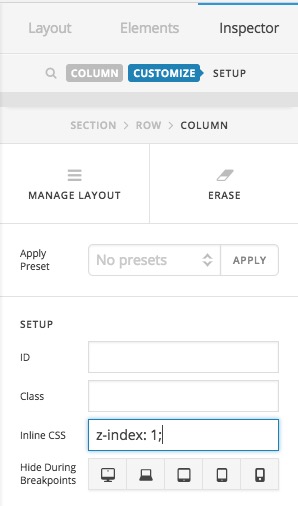
Please go to the options of the first column and in the Inline CSS option add z-index: 1;:

Do the same thing for the second column and add z-index: 2; instead. After that change the CSS code for the BOT:

.bot {
    background: url(http://pngimg.com/uploads/girls/girls_PNG6463.png);
    background-repeat: no-repeat;
    background-size: 300px,cover;
    height: 500px;
    margin-left: 80%;
    z-index: 999;
    width: 302px;
}

Thank you.

Hello.
Firstly, thank you for taking the time to reply.

However, I have made all those changes and this error still exists.

Hey @richardjmanning,

Try applying a z-index of 3 to your first column.

Hope that helps.

This topic was automatically closed 10 days after the last reply. New replies are no longer allowed.