Z-index - content on top of secondary navigation

Hi,
I am struggling with a situation. I have done many research (forum, online) and trials but I can’t figure out how to fix this issue.
I have build a secondary navigation as a Global Block. This is sticky at the top of the viewport.

Everything works as expected so far but the content of the pages, most particularly text and buttons, fly over the menu when scrolling the page.
The backgrounds of the sections fly under the secondary nav. as expected.

Would you mind to help me sort this out?
Hi There,

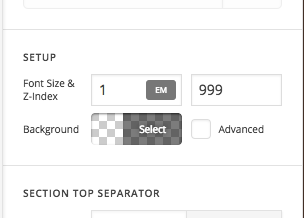
I increased the z -index of the container where the global block is, now its working fine.

Please have a look.

Thanks

Thank you so much Basanta… Grrrr I can’t believe this!! I’ve spent a lot of time at it. I couldn’t find it in the settings and all attempts of editing CSS in the editor failed.
Thank you again. Really fast reply and efficient. Perfect.

Hi again,

In addition to that you can also refer to the following article regarding z-index https://stackoverflow.com/questions/14391208/how-does-z-index-really-work or this one https://css-tricks.com/almanac/properties/z/z-index/

Hope that helps too!

Thank you Nabeel.
The problem resides on some other pages.
I have tried to find out where Basanta changed the z-index to 999. I have selected the container of the block (and subsequent parents) but I can’t find the change anywhere.
Could you guide me where this change was made?

Hi There,

Basanta is referring to the Section where you placed your Global Block


You can view the Cornerstone in skeleton view for easier access to section, rows, columns and elements.

Hope that helps,
Cheers!

This topic was automatically closed 10 days after the last reply. New replies are no longer allowed.