Hi! Just checking to see if you have a new update or how this can be fixed?
Thank you!
Hi! Just checking to see if you have a new update or how this can be fixed?
Thank you!
Hi @jmonroe08,
Thanks for reaching out.
We will have an update on X Theme WooCommerce files on the next cycle of our updates but if you prefer, you can change the version numbers directly of the files within /x/woocommerce folder. In version number it doesn’t mean that Woocommerce changed their codes as well, they normally change versions in every update just for consistency, but the coding remain the same. If you found issue due to incompatible templates, then you can provide us more information about it and we’ll investigate.
Hope that helps and please bear with us.
Thank you.
Is it enough just to change version number?
At the moment I have one conflicting WooCommerce template - it is in parent (X) theme, not child one:
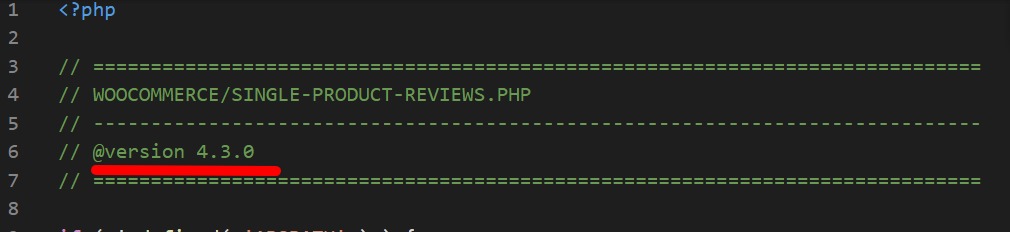
x/woocommerce/single-product-reviews.php version 3.6.0 is out of date. The core version is 4.3.0
When I compare it to the one shipping with WooCommerce 4.3.1, there are a lot of differences in the code. Can someone from the team verify?
Hi @jmonroe08,
Our theme overrides some WooCommerce templates, and update those once updated by WooCommerce.
WooCommerce latest version 4.3.1 updated single-product-reviews.php which will be updated in the next version of the theme.
We will notify our development team on it. Please stay tuned for the theme update.
Thanks
Same issue. Let me add more info.
The error is about the child theme of Pro. It seems it can be downloaded here: https://theme.co/docs/child-themes
The latest child Pro theme (from 2017) doesn’t seem to include any woocommerce folder:
So just by deleting the old Pro child and installing the “new” one would fix the issue? (Then copying the code I’ve including on functions.php along the years…
Hi @educainventions,
Thanks for your information.
Let me clarify more, that the issue is coming due to the version of the file single-product-reviews.php used in our theme and the WooCommerce.
For the temporary fix, you can create a woocommerce folder in your child theme, and copy the file single-product-reviews.php from the parent theme’s woocommerce folder.
Edit the version top that file to 4.3.0 will resolve the issue.
Thanks
This topic was automatically closed 10 days after the last reply. New replies are no longer allowed.