Hi there,
I have been using xtheme for quite some time now, and due to recent update I lost access yoest breadcrumbs.
I tried everything I could adding it to the function.php in the child theme but nothing seems to work, can you please help
Hi there,
I have been using xtheme for quite some time now, and due to recent update I lost access yoest breadcrumbs.
I tried everything I could adding it to the function.php in the child theme but nothing seems to work, can you please help
I activated the child theme and added the below code in the child theme, but some of the page shows the breadcrumbs some of them wont.
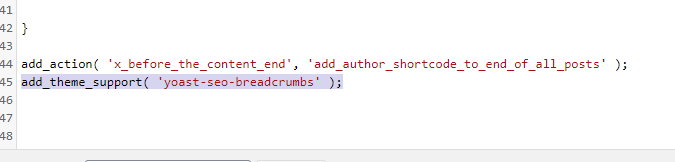
As you can see after updating the child theme the breadcrumbs are shown in some of the posts

at the same time, some of them don’t even show the breadcrumbs at all.

Morever, if I activate the xtheme back again after editing the child theme, nothing works.
Hi Saifudheen,
Thanks for reaching out.
The reason behind the issue is the Posts Page is not set yet. I set the About page temporarily and it works. Please find the screenshot describing the options.
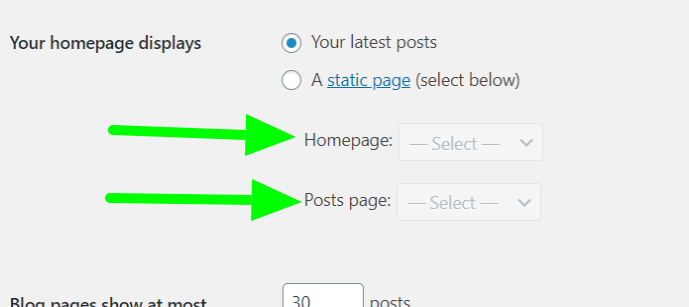
I have created a page named Blog which can be set as the Post Page without setting the Home Page, so the Home Page will show the posts as previous.
Hope it helps.
Thanks
Hi tristup,
Thanks for checking that, it somewhat helps but not completely.
Before I used to get main categories as the breadcrumbs but now, it just shows blog, irrespective of the blog category I go to.
for example
When I click on the SDN -> Nuage-SDN , it shows perfect however when I click on any posts from that page it doesn’t show what category it belongs rather just shows blog.

As you can see, it doesn’t show the main category it belongs to, prior to the upgrade it used to show the main category.
I always put the blogs in the main category and sub-category, by doing that it would show the main category as the breadcrumbs, and end result is a good user experience, which is missing now.
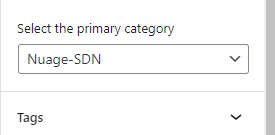
Can you please help me fix this?
Hello Saifudheen,
Please make sure that you are up to date. And then switch to your Child theme so that the code you have added in the child theme’s functions.php file will make sure that the Yoast Breadcrumb will display and not the built-in breadcrumb of the theme.
// Additional Functions
// =============================================================================
if ( ! function_exists( 'x_breadcrumbs' ) ) :
  function x_breadcrumbs() {

    if ( x_get_option( 'x_breadcrumb_display', 1 ) && function_exists('yoast_breadcrumb') ) {
      yoast_breadcrumb('<p id="breadcrumbs">','</p>');
    } else {
      echo '<p>Please install Yoast Breadcrumb plugin.</p>';
    }

  }
endif;
Best Regards.
I have the above codes in my child theme and when I activate the child theme it works fine but after I activate the xtheme it goes back to the old.
So question is, should I keep the child theme activated? and that would inherits the functions from the main theme?
or I need to activate the xtheme itself, then I am missing something because the code in the child theme is not syncing with the main theme.
Hi @saif39,
Yes, please activate your child theme because it will just inherit all the functionality of the main theme. The purpose of the child theme is where you add your customization so that when you upgrade your main theme it will not wipe out the customization you have done.
Hope that helps.
Thank you.
This topic was automatically closed 10 days after the last reply. New replies are no longer allowed.


