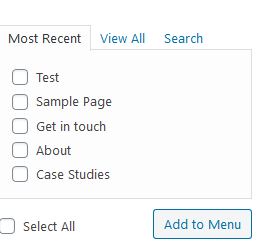
Hi there, I’ve installed the UberMenu plugin provided by X-Theme and I continued to set up the menu. I was referring to the videos provided by UberMenu on setting up the menus but I noticed that my menus section looked different. I could not find the Mega Submenus, Flyout SubMenus, Images under the pages tab in my menus section. Can you clarify on this? Is there any other steps to be taken for those items to appear under the pages tab in my menus section? Or how?
This is the screenshot of the pages tab in the menus section from my website.