X-Theme Integrity, Style of Mobile Dropdown menu

Hi

I have spent a few hours now trying to find out, how to style the mobile dropdown-menu (the menu appearing when clicking on the burger icon).

Two questions:

1.) Generally: Where can I customize that menu?

2.) Specific: I seem to be unable to find the place where I can style the border of the menu items.

Now it looks like this:
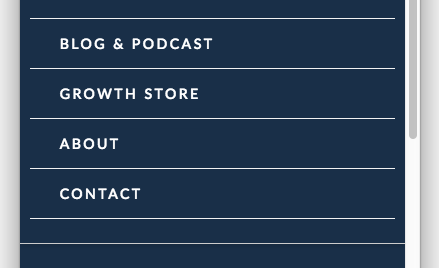
while I would like to make it look like this:
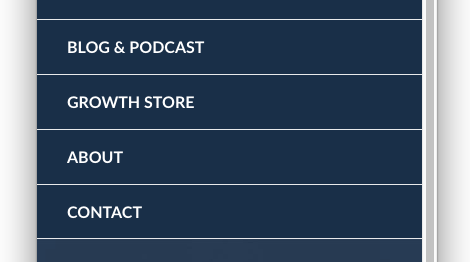
In words:

The lines should have the full-screen length. Furthermore, the “bottom” border (= header navigation border) should only appear once.

Any advise how I can change this within the Integrity CSS?

Thank you for any help!

Hello @Anderheggen,

Thanks for asking. :slight_smile:

Please add following CSS under X > Theme Options > CSS to have fullwidth mobile menu:


@media only screen and (max-width: 600px) {
    .x-navbar-inner .x-container.max.width {
    width: 100% !important;
}

.x-brand {
    margin-left: 10px;
}

/* border-bottom code*/

header .x-navbar .x-navbar-inner ul.x-nav li a:last-child {
    border-bottom: 0 !important;
}
} 

In above code I have shared a snippet for border bottom. Please add the same and let us know if that’s the output yo are looking for. If not, please elaborate the question.

1- I have found the proper CSS code selector using the Chrome browser Developer Toolbar: https://www.youtube.com/watch?v=wcFnnxfA70g

2- For the CSS code itself, I suggest that you get started with this tutorial: https://www.youtube.com/watch?v=yfoY53QXEnI

Thanks.

Hello @Prasant

Thank you very much! I definitely have to upgrade my CSS skills… :smile:

Yes, that is already very close to what I am looking for.

The main “issue” now is that now the last child is too far away from the header border below:

Any idea how to solve this?

Furthermore, I’d like to increase the height of the menu items to 54px. I’m again not sure where exactly to change that (tried a few things now, but didn’t work.)

Anyway, thank you for the awesome support!

Best,
Andrea

Hello Andrea,

To make the last menu item closer to the header border, please make use of this code:

.x-navbar .mobile .x-nav {
    margin-bottom: 0;
}

At the moment, the height of the menu items were already 54 pixels.

Hope this helps.

Perfect!!! Thanks a lot!

You are most welcome!

This topic was automatically closed 10 days after the last reply. New replies are no longer allowed.