X Theme Cornerstone editor not loading, Revolution Slider Conflict

Cornerstone will not load when I try to edit a page, unless I deactivate Revolution Slider. I am running the latest version of Wordpress and all plugins and themes as of this posting. I tried the following:

  • Clearing System Cache under [Pro/X/Cornerstone] > Settings in the Dashboard, “Clear Style Cache” button
  • Increased my memory allocated to PHP1. To increase it, I edited my wp-config.php file and inserted these lines: define( 'WP_MEMORY_LIMIT', '256M' ); define( 'WP_MAX_MEMORY_LIMIT', '512M' );

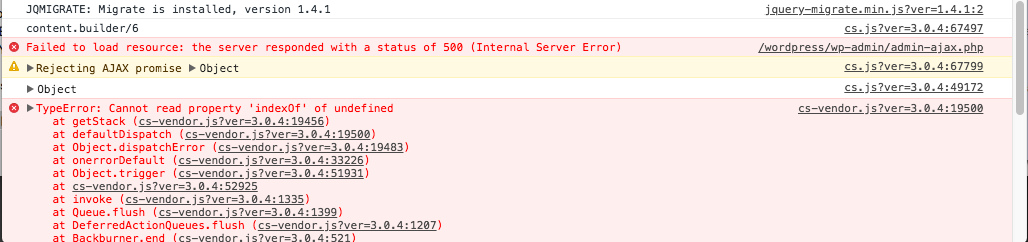
I’m noticing the following issues in the Console Log when I try to load the Cornerstone page editor:
Hi There,

Thank you for writing in, I see that your PHP and MySQL version is out of date, please update your PHP and MySQL to version 5.6 or greater (Wordpress requirements), please contact your hosting support on how you can update the PHP and MySQL effectively.

While you’re at it, also ask your hosting support why your site certificate is invalid this could be related to the 500 internal server error issue.

If updating PHP version does not work, please provide us FTP credentials on a secure note.

Cheers!

This topic was automatically closed 10 days after the last reply. New replies are no longer allowed.