Hi,
We’re using the “Classic Recent Posts” element on our home page and the drop down box only allows a maximum of 4 posts. We would like to have up to 6 posts. How can we do that?
Thanks!
Hi,
We’re using the “Classic Recent Posts” element on our home page and the drop down box only allows a maximum of 4 posts. We would like to have up to 6 posts. How can we do that?
Thanks!
Hi there,
The Recent Post element could only contain a maximum of 4 posts but you can make use of the element’s offset option.
What you can do it to add several Recent Post element then set a value to the offset field.
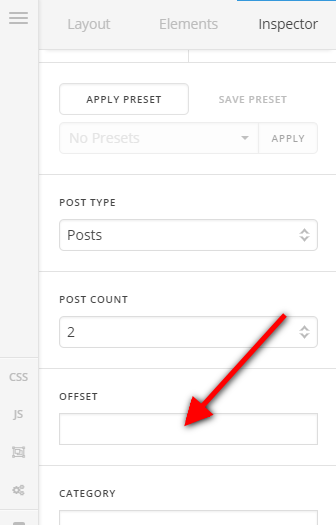
For example, the first recent post element will display 4 posts. Leave its offset field blank so it will display the normal the 4 most recent post element. If you want to add more posts, add another recent post element then set 4 to the offset value of the element. That element will then display the 5th, 6th, 7th, and 8th recent posts.
If you want to display more items, you can just add more recent post element and increment the offset value of the element.
Hope this helps.
This topic was automatically closed 10 days after the last reply. New replies are no longer allowed.