X theme button code for visual composer

I can’t find the page that shows how to add button shortcodes for x theme.

I’m not using Cornerstone on this site and can’t switch it over without re doing the entire website. Can someone point me to where that content is please?

I really dis like the updates to the documentation - i can’t find anything any more, don’t like cornerstone and am thinking of finding a new theme for my websites since it feels like traditional “X theme” is being abandoned.

Please advise.
Hi Ryan,

Thanks for reaching out.

We have no longer the list of legacy shortcodes as we no longer recommend it, I recommend creating your content and buttons through Global Block, then you can use the global block shortcodes.

Please check this for more information https://theme.co/docs/use-shortcodes

Thanks!

This does not help me. I am not going to start using new shortcodes on sites that are 5 years old and create a mix of how this material is implemented please post the old shortcodes so that I can support legacy websites.

I can’t afford to go through all of my old websites and update how this is implemented. I just need to add a button and I’ve already got these style setup in my xtheme build - I don’t want to start all over again.

Hello Ryan,

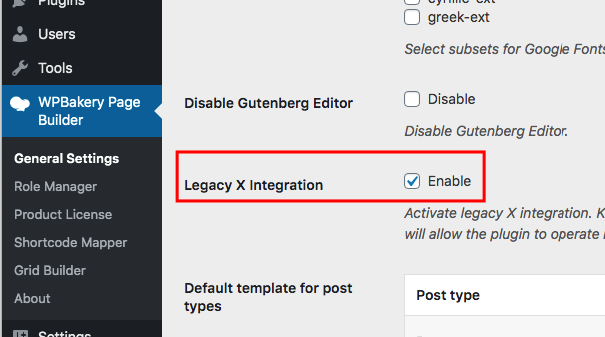
Instead adding the legacy shortcodes, you can enable the legacy X elements. Go to WPBakery Page Builder > General Settings and turn ON the “Legacy X Integration”.
-gexnlnpSk27fjRgkgpXUA

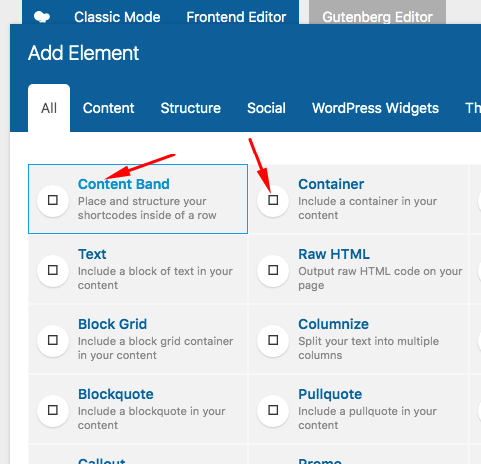
And then when editing the page/post using the Backend Editor or Frontend Editor, you can insert the legacy X elements. You’ll know that it is the legacy X shortcode because it has a black and white icon. At the moment, it is showing square icons on my installations because I have SSL issue.
1ROwJAimTAm8ks50o1qHkw

Hope this helps.

This topic was automatically closed 10 days after the last reply. New replies are no longer allowed.