X Pro: Posts Blog Pages and Woocommerce Shop Styling

Hi there,

I am finding it hard to understand how Woocommerce and even the comment section and images for blog posts can come out of the box looking like this…

The sizing is ridiculous. My featured images take up half the page, the comments headings are 140px and my product images on the shop pages are huge. Is there an easy way to customize these without coding? I have a bit of experience with adding CSS but surely there is a simple way to change these.

Matt
Hi Matt,

Thanks for writing in. This could probably be a caching issue, have you tried clearing or purging your cache? If yes, and the issue is still there after doing it, then please share to us a link to your site so we can take a closer look.

Thanks!

Hi there,

I have purged my cache and still no changes. Please take a look at my website below.

Summary

My website is www.cliftoncbd.com

Kind regards,
Matt

Hello Matt,

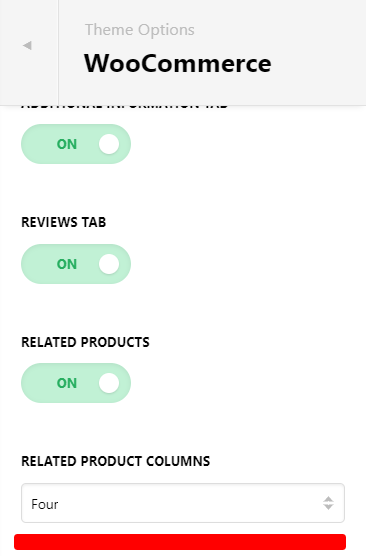
Yes, I can confirm related products is large because it just 1 column. Please set 2 or more columns on Pro > Theme Options > Woocommerce

For the comments section, it is large because of your settings for Typography. See this: https://screencast-o-matic.com/watch/cYf61uaBzQ

Please adjust it on Theme Options > Typography. Your based typography is too large. 50px for desktop is too large. You can inspect it adjust the font.

Hope this helps.

Hi Lely,

Thank you for your response. Everything worked perfectly! Thank you!

Matt

You’re most welcome, Matt.

This topic was automatically closed 10 days after the last reply. New replies are no longer allowed.