X Pro Headers - Flex \w Internet Explorer and Older Browser Versions

Hi.

I understand that a low population of people actually still use internet explorer and older versions of browsers, but it has come to my attention that I do have a good portion of visitors who do use them. And it has affected our traffic.

With that said, the menu doesn’t show because the flex doesn’t work approrpiately on these versions. The CSS is different.

And I was hoping you could take a look at least for the menu. Users should at least be able to navigate. And I can probably figure out the rest for other things.

In my case, the navigation doesn’t show up. But that is because it’s a CSS issue. If I open the inspector, I find it’s a result of the flex-column.

Anyways, please take a look to see if you can fix the CSS to work with Inernet Explorer.

Thanks.
Hey @JfantasyBooks,

IE is peculiar of Flex setup. There’s a specific combination of settings that will work cross-browser.

Please give us the URL of your site and a screenshot of the issue so we could see your current setup and advise you of the correct one.

Thanks.

Hi @christian.

Thanks for replying. The website is added to the secure note. If you can see, the menu on desktop is missing, and the one on mobile is centered off.

Hey @JfantasyBooks,

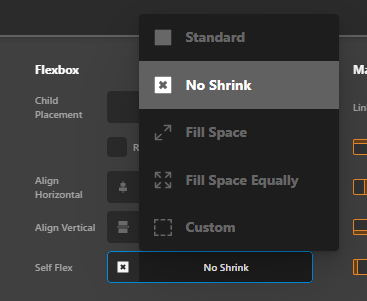
For the menu to show up on IE, you need to set the Container to Self Flex to No Shrink.

image

The menu would show up but will be centered so you need to set the Navigation Inline > Top Link > Align Horizontal to Start. This is the solution to the off-centered mobile menu also.

image

Hope that helps.

This topic was automatically closed 10 days after the last reply. New replies are no longer allowed.