Hi, I have to say that I am not getting on with X Pro at all and I am finding it very difficult to work out how to use the header builder.
How do I set each container a specific amount of columns like 6/12, 3/12 etc?
I have a hero image background with the main focal point image set to the left of the background, and on the right I want to add some stacked headlines that are centered in the column.
Basically I want 2 columns that are both 6/12 that sit over the background image.
Also I have set a top bar that will contain my logo, nav bar etc and underneath I have created another bar with an image background that I want to fill the height of the screen, but I cannot find anywhere how I can set this to be full screen height so the whole of the background image shows.
So how on earth do I do this please?
Hi @danbentonsmith,
Thanks for reaching out.
Header has different layout than standard columns. It uses flex layout instead of just float syling. Hence, you’ll have to manually add the width by percentage instead of 6/12, 3/12, 3/12.
Example, 12 = 100%, hence, 12 = 12,
So, the column you want is 6/12, 3/12, 3/12 which are 3 columns but with total of 12/12.
100% / 12 = 8.33% (per 1/12)
First container is 8.33% x 6 = 49.98%
Second container is 8.33% x 3 = 24.99%
Third container is 8.33% x 3 = 24.99%
Then let’s change the container’s flex size according to those values.
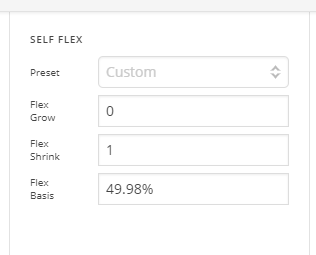
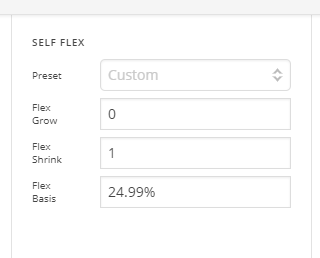
Resulting to this

Hope this helps.
This topic was automatically closed 10 days after the last reply. New replies are no longer allowed.