X is validated but Cornerstone not automatically validating

Please can someone contact me securely so I can provide login details for someone to take a look?

I need to use Cornerstone to design my site but it keeps telling me it’s not activated until I activate X … which when I click X on the left menu it shows me its perfectly fine and activated!

Very confusing, please get in touch ASAP.

Thank you,

Hello @dstewardconsulting,

Thanks for asking and sorry for the trouble you are facing.

Can you please share/confirm the website URL? I tried accessing dstewardconsulting.co.uk but I am getting This site can’t be reached dstewardconsulting.co.uk’s server DNS address could not be found. error message.

Thanks.

Hi sorry, the details I gave you were to log into my word press admin centre to see the error message / non validation I am facing

Please go to the following address and then use the details I supplied

http://46.32.240.37/dstewardconsulting.co.uk/wp-login.php

thanks, if you can just fix it from your side and let me know asap that it’s done and ready to go then that would be great! thanks

Hi There,

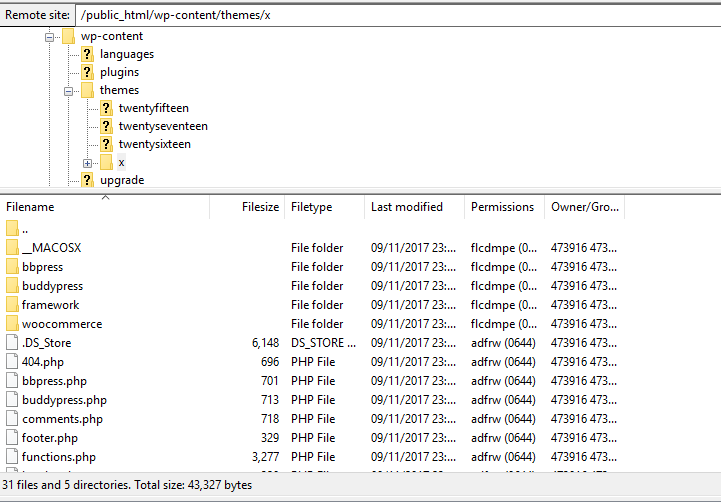
Please login to your FTP account and rename this directory from /wp-content/themes/x/x/ to /wp-content/themes/x/.

Hope it helps :slight_smile:

I am really frustrated as I purchased this days ago and still can’t seem to use Cornerstone to start designing my website…!!

Thank you for your ideas and help but nothing is working, @thai please see my screen shot enclosed having changed the directory as per your instruction.

Can someone please urgently assist me with this? ??

Hello @dstewardconsulting,

I logged into the website (http://46.32.240.37/dstewardconsulting.co.uk/) using the login details shared by you. I see that X Theme is validated and so is Cornerstone. I also tried to open few pages using Cornerstone and I got following error message:

Not Found The requested URL /dstewardconsulting.co.uk was not found on this server.

I went ahead to see the permalinks settings, and I could see that the system was using default permalinks settings. I change the same to Post name structure and now Cornerstone is working fine. https://screencast.com/t/gHGc2hkcm

Kindly clear browser cache and try accessing Cornerstone again.

Thanks.

This topic was automatically closed 10 days after the last reply. New replies are no longer allowed.