Is there a way to remove the page name from appearing just above my first section? I think the ID is header.entry-header, or more specifically, h1.entry-title. I can change the color of the text, but I don’t know how to stop this page name from appearing completely.
Hello There,
Thanks for writing in! You can turn of the page title instead. Simply edit the page in Cornerstone and find the X Settings the settings tab.

Hope this helps. Please let us know how it goes.
YES!
Is there any way to remove the white space surrounding all my content?
Hello There,
Thanks for updating in!
To remove the white space surrounding all your page content, please add the following CSS code in the X > Launch > Theme Options > Global CSS (http://prntscr.com/evui3r)
.page-template-default .entry-wrap{
    padding: 0;
}
Please let us know how it goes.
Ok. New site, XPro, same question. I just purchased a new license for a new website. I cannot edit page in Pro to turn off page title as I did in Cornerstone. How do I do it in Pro?
Hi again,
You can disable page title via Page Settings by editing the page in WordPress page editor (see screenshot)
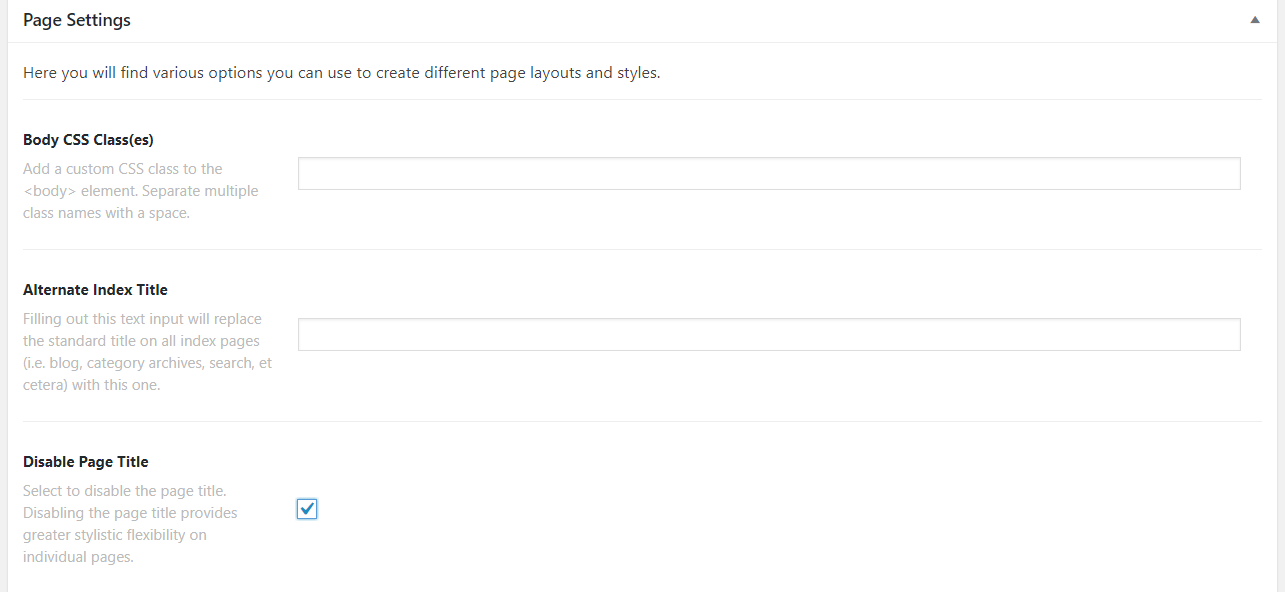
Hope this helps!
YES!
Thank you.
Glad we could help.
Cheers!