WPML Plugin Menu Icon

I am trying to get WPML plugin working properly and have noticed that when the language selector is placed in the header menu it puts a random X icon in front of that menu item. Since this menu item is added through the plugin and not through the Menu area I am not able to edit the icon or remove it.

I’d like it gone if you have a code snip or idea on how to get rid of it.

Screenshot:
Hi @Boans,

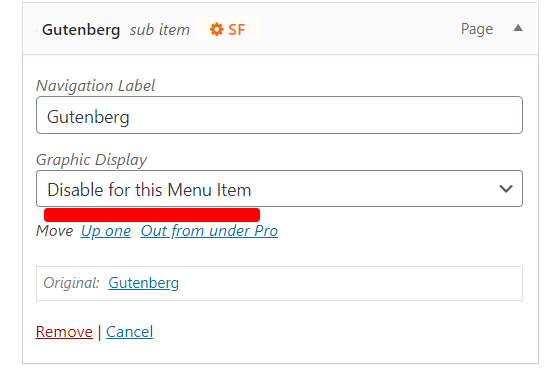
Please go to Appearance > Menu. Select the specific menu link. Disable the Graphic Display on the menu item by selecting this option:

Hope this helps.

Hey lely,

Thanks but what I was trying to explain is that the plugin appends that menu item to the end of the menu and it does not appear in the list within the menu area so I think the only way would be to use CSS to block it since it just uses a default ‘X’ icon. The screenshot helps a little.

Hello @Boans,

To resolve your issue, please add the following CSS code in the X > Theme Options > Global CSS (http://prntscr.com/evui3r)

.wpml-ls-item span.x-graphic {
    display: none;
}

Regards.

Perfect thanks!

You are most welcome!

This topic was automatically closed 10 days after the last reply. New replies are no longer allowed.