Hi guys!
Picking colors from the page is an often repeated task. I do have browser addon, but it conflicts with X/Pro.
Any chance of integrating native WordPress’s Iris color picker into Cornerstone?
Thanks!
Hi guys!
Picking colors from the page is an often repeated task. I do have browser addon, but it conflicts with X/Pro.
Any chance of integrating native WordPress’s Iris color picker into Cornerstone?
Thanks!
Hello There,
Thanks for writing in! The X theme and Cornerstone is using Huebert. This was introduced when we released X 4.3.1 (https://theme.co/changelog/#theme-x-4-3-1). This is no way you can integrated Iris color picker in Cornerstone. It would be a complete re code of the plugin which we do not recommend if you want to replace Huebert with Iris.
Hope this helps.
I was probably not very clear. Sorry. Iris is most likely not needed at all for this specific functionality. 
Huebert is great. It just lacks this little thing of being able to pick up colors from the page, when clicked on certain areas.
Browser addons used to work great inside Cornerstone but after the last major update the little cross-hair for picking colors gets stuck when it goes into the Content editor’s area. For example, I use the Firefox’s native color picker. I have to go to the live page to make it work.
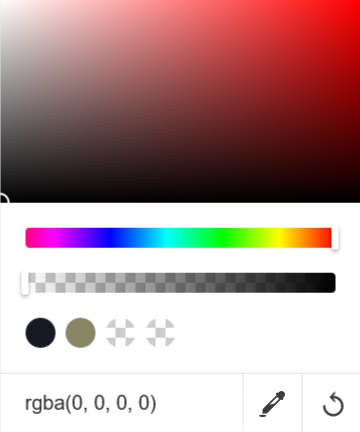
So I was thinking if it was possible to add that Color picker thing to Huebert, which activates the cross-hair when clicked, and then when certain area inside the content builder is clicked, Huebert automatically changes to the color of that area.
The best UX with Color pickers I have ever seen was a browser addon that is unfortunately not available anymore. It worked in the way that the color picker icon was clicked to activate it, which created a cross-hair, and then hitting the Escape Key on the keyboard would automatically save the color into the clipboard and deactivate the picker.
Here is a little mockup:
Anyway, that’s it.
thanks!
Hi Misho,
Now I understand what you mean. I added a feature request regarding this. If it is something feasible and if there are more customer asking for this our developers will consider implementing the feature.
To give you an idea why the browser extensions to pick a color do not work in the content builder, it is caused by the fact that all those extensions wrap the whole page inside an iFrame so that they can detect the colors, but that action ruins the whole layout of the content builder because the content builder itself uses the iframe to show the live content.
At the moment you do not have any choice other than having the front end of the website opened in a separate tab, and use a browser extension such as the ColorZilla to pick the desired color, then go back to the content builder and paste the color code to the color picker.
Thank you for your understanding.
This topic was automatically closed 10 days after the last reply. New replies are no longer allowed.