WP Cost Estimation & Payment calculation issues with different browser language

Hi there,

I’m using WP Cost Estimation & Payment to calculate a quote including taxes.
My website is in German only and everything works fine for German users.
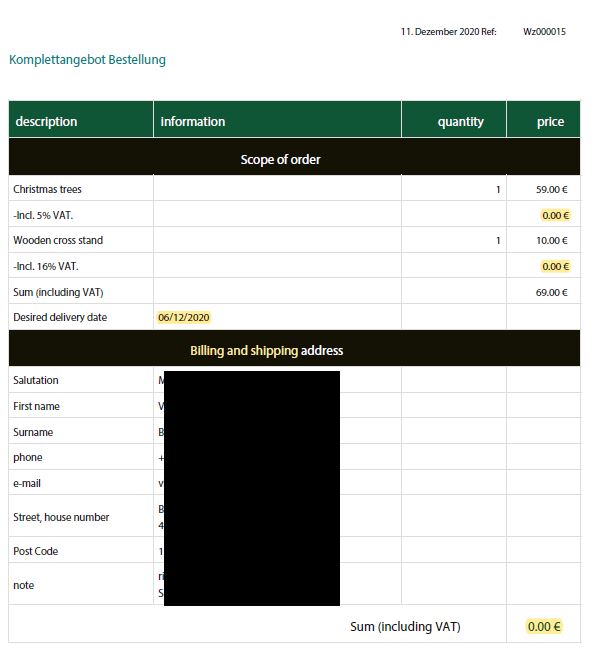
But for users with a different browser language (e.g. English) form fields auto translate even in the summary (text & email, pdf) and the math doesn’t work correct anymore. Calculated taxes are always displayed with “0” and also the final cost is always set to “0”. How can I avoid that?

Hey @ArtOfSpring,

I’m sorry but I couldn’t replicate the issue or I’m not replicating the issue properly. Would you mind showing us the correct way to replicate the issue? On my end, even in German language, the tax is 0.

Thanks.

Hi there,

in your case the tax is 0 because the item with that tax rate wasn’t selected. As I said it all works fine in German. I guess it only occurs if the user auto translates the website (e.g. with Chrome). It’s visable in the mail and pdf (I’ve attached a screenshot). Taxes and sum are missing. Also there was a delivery date selected that wasn’t available at that time (selected date was in the past)

Hi @ArtOfSpring,

I have tested the same and didn’t find any such issues, even after translating using the Google chrome. Can you please provide any screenshot marked with the issue or any video that helps us to recognize the problem?

Thanks

This topic was automatically closed 10 days after the last reply. New replies are no longer allowed.