WP-admin backend display suddenly 50% smaller

Hi there,

While I was working on my website, the screenview on the backend (wp-admin) suddenly changed to 50%, I have no idea how and why and can not find the settings to change this back to 100%?

https://www.flowdivision.com/wp-admin/admin.php?page=x-addons-home
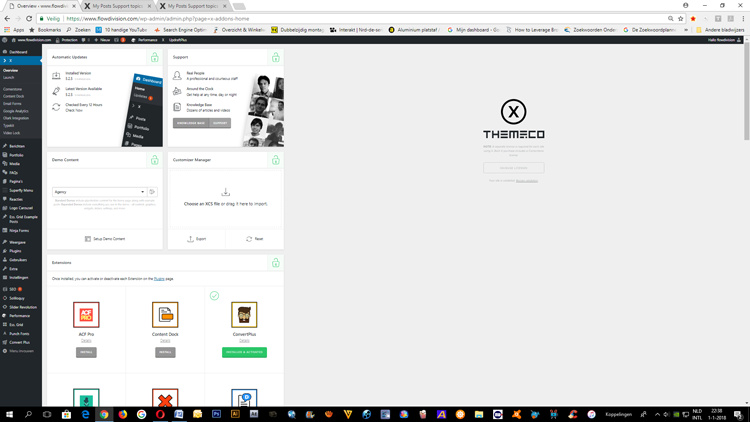
Thanks!

Hello @flowdivision,

Thanks for asking. :slight_smile:

Can you please try resetting browser zoom level? All you need to do is click on reset button as shown in screenshot. https://screencast.com/t/bQaI0FcrYC2z. Have also created a screencast that you can take a look. https://www.screencast.com/t/QOcfbDPn

Thanks.

Helo there,

Reset is not working.
Only in google chrome there is this problem with WP-admin showing in 50% in IE it’s working fine.
If I open WP-admin for another website of mine in google chrome there is no problem either.

So the problem defined: WP-admin shows in 50% size when used for www.flowdifision.com in Google chrome!

Thanks

Hey @flowdivision,

Please try the following:

  1. Clear your browser cache and deactivate all browser extensions.
  2. Try in incognito mode.
  3. Try testing for a plugin conflict. You can do this by deactivating all third party plugins, and seeing if the problem remains. If it’s fixed, you’ll know a plugin caused the problem, and you can narrow down which one by reactivating them one at a time.
  4. Remove all customizations including custom CSS, custom JS and custom templates.

Thanks.

Hi There

Problem is solved!

Thank you for your assistance.

Glad that you have managed to fix the issue. Thanks.

This topic was automatically closed 10 days after the last reply. New replies are no longer allowed.