Woocommerce Redirect after checkout & view basket

Hi,

After view basket or checkout - takes to single product page showing out of stock item, instead of basket or checkout.

works on default themes.

When speaking to Woocomm they have provided below:

When contacting them, you can share:

  • Cart and Checkout redirect to a product page showing “out of stock”
  • Issue resolves when switching to a default WordPress theme
  • WooCommerce 10.5.1, WordPress 6.9.1
  • Using block-based Cart and Checkout pages, but also tested with classic cart shortcode.

Was working prior to Nov 25

Hey Andy,

Regretfully, we don’t understand what you mean. Kindly provide specific steps so we can replicate the issue in our site and what is the desired result or the behavior before Nov 25.

Alternatively, you can record a video of the issue and what happens when using a default theme.

Thanks.

Hi Christian,

When a visitor clicks either view basket or to go to checkout. They’re redirected to a single product page, with the out of stock banner.

https://fletchermoorland.co.uk/basket/

This has only started happening since November 2025. Prior to that the checkout and view basket worked fine.

The desired result is that the customer isn’t shown a single product page with an out of stock banner, but is instead show either, “the basket” or able to “checkout”.

I hope that helps?

We’re under significant pressure to resolve this, is there a faster way of communicating?

Hi,
im not from the theme.co support but is there any custom redirect script? or redirect plugin?
Did you check this: woocommerce => settings => advanced => page setup?

when it only happens when cart is empty it seems it is a custom script?

Cheers
Harald

Hi Harald,

Appreciate you replying.

Yes, we ensured appropriate pages are set in Woocommerce.

We referred to Woocommerce support first and they advised there had been an issue with one of their updates which conflicted with Cornerstone, but that was fixed in a later release.

Woocommerce, then did the testing on our staging site and advised it works, when a default theme is used instead of Cornerstone.

Woocommerce then provided:

"* Cart and Checkout redirect to a product page showing “out of stock”

  • Issue resolves when switching to a default WordPress theme
  • WooCommerce 10.5.1, WordPress 6.9.1
  • Using block-based Cart and Checkout pages, but also tested with classic cart shortcode. *"

As information to give to Theme.Co to help look into the issue.

Theme.Co does not seem to work well with Woocommerce?!

It happens at anytime you try to view basket or checkout. Preventing any user from completing a sale.

It’d be great if there was support number, email or chat… :confused:

Hey Andy,

I see you have the child theme active. Can you please test deactivating that and see if the issue persists. Please note that we do not support child themes.

Thanks.

Hi Christian,

Tried this on our staging site and it made no difference, still takes to blank single product page.

Christian, would you like access so you can take a look?

We’re new to the forum, but assume we post that kind of information and click on the “secure note?”

I just don’t feel like we’re making any progress with a 1 message a day response. I appreciate we’re bringing this to you as a fresh problem, but for us this is 3 weeks in without any real progress.

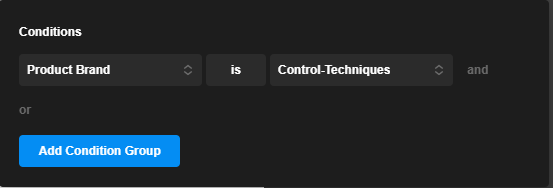
Could it be related to having 2 single product layouts?

One for those under brand “Control-Techniques” and one for all other products?

Screenshot 2026-02-25 094215

Hi,

We’ve resolved this for now.

After looking at if it was an issue with the different “single product pages” we found that the conditions for “Cart” and “Checkout” were no longer set.

So it is now at least functional :slight_smile:

Hey Andy,

It is good to know that the issue has been resolved.

Cheers.

1 Like

This topic was automatically closed 10 days after the last reply. New replies are no longer allowed.