WooCommerce Product Totals after Qty

Hello Apex Team,

As you can see in the below image, my WooCommerce final price isn’t showing after the Quantity option. It does show the per-product price, but I need it to adjust at the bottom based on Qty.
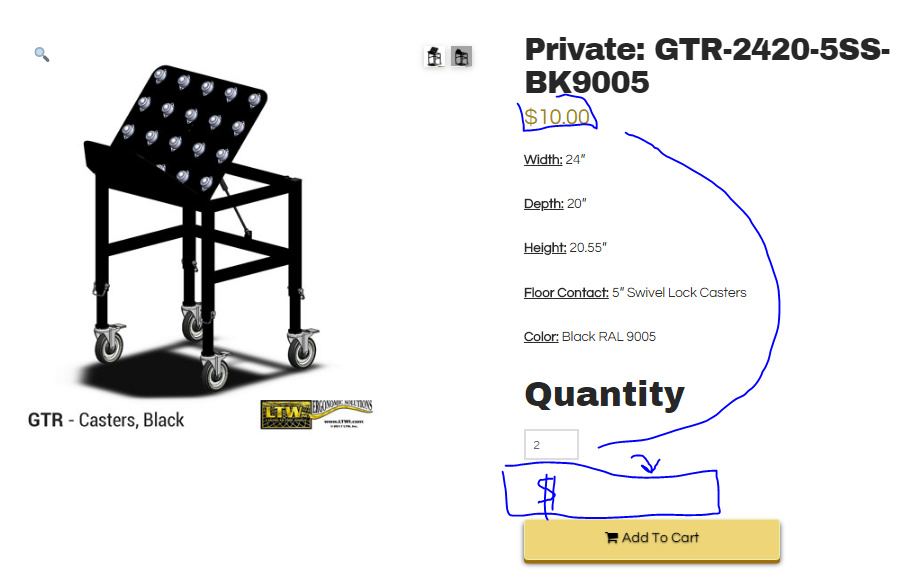
I don’t know if this problem is created by custom code I’ve put into the site over the years or if it’s just an X problem. Help!

https://ltw1.com/product/gtr-2420-5ss-bk9005/

LTW Ergo Solutions

Hi There,

To achieve that, please add this custom JS under X > Theme Options > JS:

jQuery('.single-product.woocommerce p.price').insertAfter(jQuery('.woocommerce .quantity input[type="number"]'));

Hope it helps :slight_smile:

Thanks @thai!

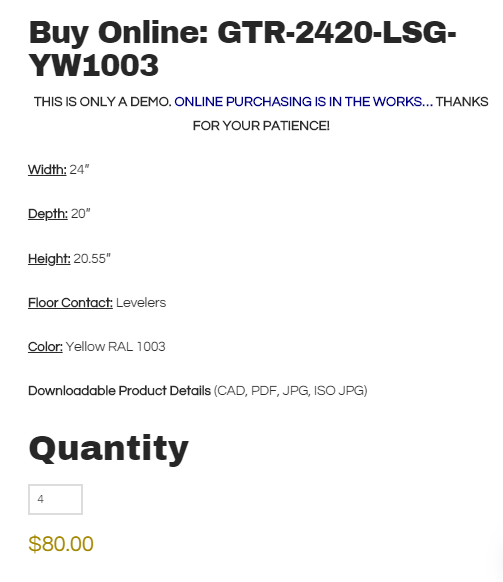
That helped to move the price to the bottom of the page, but it’s still not calculating with the quantity (here the demo price for each is 80, so the price should show multiples of that based on the quantity).

Any thoughts?
Thanks!

Hello There,

Thank you for the clarifications. Regretfully what you are trying to do is not the default and the way Woocommerce does. The price is the price of the product. What you are trying to do is to add a total product price where in you can only find it in the cart page. In the cart part, you have the price, quantity and the total price of the item. If ever you change the quantity, you will have to use the “Update cart” button to update the total price.

Hope this helps.

This topic was automatically closed 10 days after the last reply. New replies are no longer allowed.